
SmartDisk II · User documentation · Latest firmware
Make a new disk image on the board: blank, bootable ProDOS or DOS 3.3, empty ProDOS or empty Macintosh (HFS). What each choice creates, how to type the name, and a reference of every image format the SmartDisk II reads, for each emulation.
← SmartDisk II documentation home · Page 12 of 16
1. Create disk
Create disk makes a new image file in the folder of the SD card that you are looking at, with a name you type. Use it for a blank disk that you format and fill, a disk that boots, or an empty Macintosh disk.
The board makes the image. You do not need a computer.
What Create disk offers depends on the emulation that runs, because an image that the emulation would not list is no use.
HD20 emulation (Macintosh): upcoming. It is not available in this firmware yet. The Emulation type list shows an HD20 (Mac) entry, but you cannot use it yet.
Make an image
The screens are on the OLED screens page.
- In the File manager, open the folder where you want the image.
- Press ENTER on the
.entry of the folder. Directory options opens with Refresh, Create disk, New folder and Delete folder.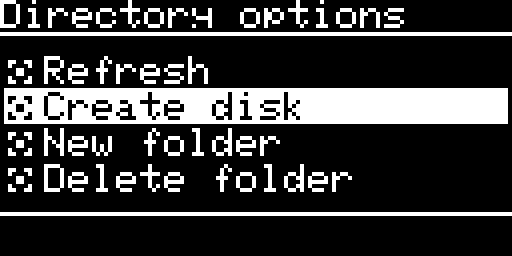
Directory options, with Create disk selected For SmartPort, reach the file manager with Select image from, then File manager (SmartPort emulation).
- Choose Create disk. The New disk screen asks what the new disk holds. UP and DOWN move, ENTER chooses and RET goes back one screen.
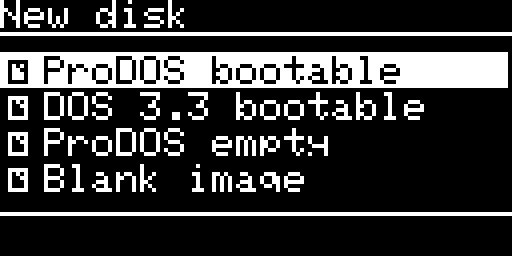
The New disk screen on the Disk II: four contents - Choose the kind of disk: the size and the file type. This screen is skipped when the content has only one kind of disk on the running emulation. For example, DOS 3.3 on the Disk II is always a 140K
.dsk.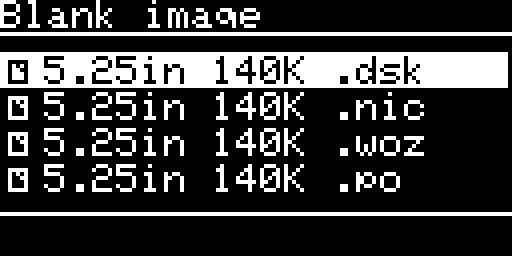
The kind of disk for a blank image on the Disk II - Type the name (next section). Choose [OK].
- The screen shows Please wait… while the board writes the image. The keys do nothing meanwhile. The folder is then listed again with the new image.
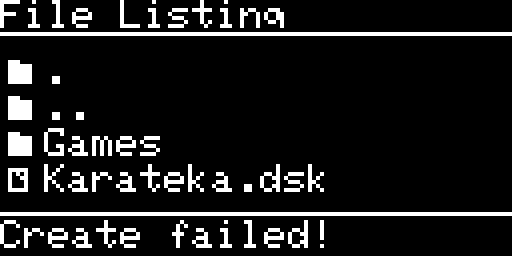
If the board cannot make the image, the footer of the list shows Create failed! (the card is full, the card does not answer, or no free name was found).
Type the name
The Image Name screen starts with a default name for the content: PRODOS, DOS33, DATA, UNTITLED or NEWIMAGE.
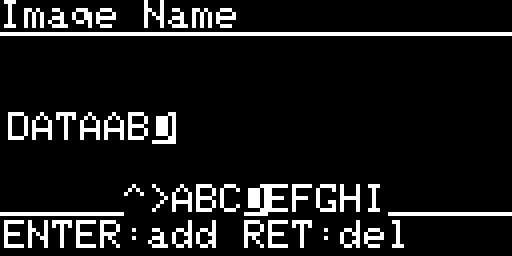
- UP and DOWN go round 42 items:
AtoZ,0to9,.,-,_, the space, the case toggle and [OK]. Hold a key to go faster. - ENTER adds the character that is shown. On the case toggle (
[a/A]), ENTER switches the letters between upper and lower case. On [OK], ENTER makes the disk. - RET deletes the last character. Hold RET to delete one character per repeat. The fifth repeat clears the whole name. With an empty name, a press of RET goes back one screen.
- A strip under the name shows the five items before and after the cursor. In the strip,
^is the case toggle,>is [OK] and~is the space. - The name holds up to 30 characters. The display shows the last 14.
- [OK] with an empty name uses the default name.
Note: From the first item, UP goes to [OK] at once. That saves a long way round.
New folder and Delete folder
The name editor also makes folders.
- New folder opens the Folder Name editor, with the default
NEWFOLDER. The name holds up to 30 characters. A leading dot or space and a trailing dot or space are removed, and a character a FAT card cannot keep becomes_. If the folder exists, the footer says Folder exists!. - Delete folder deletes the folder you are in, only when it is empty. The first ENTER asks (
ENTER: delete folder) and the second does it. The board then lists the parent folder. The footer says Not the root for the root of the card and Folder not empty for a folder that holds something.
Where the file goes, and its name
- The file goes in the folder that is listed, with the name you typed and the extension of the kind of disk:
PRODOS.po,DOS33.dsk,DATA.2mg. - The board never replaces an image. If the name is taken, it adds
_2,_3and so on up to_99:DATA_2.po. If no free name is left, the job fails. - A file that cannot be written completely is removed.
- The volume name inside the disk comes from the name you typed: upper case, only letters, digits and dots (any other character becomes a dot), a letter first (a
Vgoes in front when the name starts with something else), 15 characters at most. The file name does not change.
A DiskCopy 4.2 file holds the volume name as its disk name. An HFS volume uses it as the volume name. A DOS 3.3 disk has no name: its volume number is 254.
What each emulation offers
A content is listed only if it has at least one kind of disk that the running emulation lists and can mount. While the Smartloader runs, Create disk follows the emulation chosen in the loader (without the HFS content).
| Content | Disk II | SmartPort | 3.5 inch drive |
|---|---|---|---|
| ProDOS bootable | 140K .po (no choice) | 8 kinds: 5.25 140K .po; 3.5 400K and 800K .po; 3.5 400K and 800K .2mg; HD 32M .po, .2mg and .hdv | 8 kinds: 3.5 400K and 800K as .po, .2mg, .dc42 and .moof |
| DOS 3.3 bootable | 140K .dsk (no choice) | not offered | not offered |
| ProDOS empty | 140K .po (no choice) | the same 8 kinds | the same 8 kinds |
| HFS (Mac) empty | not offered | not offered | 4 kinds: 800K as .dc42, .img, .2mg and .moof; with the Macintosh host on, also a 1440K .img |
| Blank image | 140K .dsk, .nic, .woz and .po | the same 8 kinds as ProDOS | 9 kinds: 3.5 400K and 800K as .po, .2mg, .dc42 and .moof, and 800K .img; with the Macintosh host on, also a 1440K .img |
The menu offers the 800K Macintosh volume only, not 400K.
What every kind of image is
| Kind (menu text) | File | Size on the card | What is in it |
|---|---|---|---|
| 5.25in 140K .po | .po | 143,360 bytes (280 blocks) | raw blocks, ProDOS order |
| 5.25in 140K .dsk | .dsk | 143,360 bytes | 35 tracks of 16 sectors, DOS order |
| 5.25in 140K .nic | .nic | 286,720 bytes | 35 x 16 sectors of 512 bytes, 416 of them nibbles |
| 5.25in 140K .woz | .woz | 234,496 bytes | a WOZ 2 file, 35 tracks of 51,024 bits, quarter track map |
| 3.5in 400K .po, 800K .po | .po | 409,600 or 819,200 bytes | raw blocks (800 or 1,600) |
| 3.5in 400K .2mg, 800K .2mg | .2mg | 409,664 or 819,264 bytes | a 64 byte 2IMG header (creator SDII, ProDOS order), then the blocks |
| 3.5in 400K .dc42, 800K .dc42 | .dc42 | 409,684 or 819,284 bytes | an 84 byte DiskCopy 4.2 header, the blocks, no tag bytes |
| 3.5in 800K .img | .img | 819,200 bytes | raw blocks |
| 3.5in 1440K .img | .img | 1,474,560 bytes | raw blocks (2,880), for the 3.5 SuperDrive setting of a Macintosh host (see below) |
| 3.5in 400K .moof, 800K .moof | .moof | 665,088 or 1,328,640 bytes | an Applesauce MOOF file with the GCR tracks of the blocks, one side or two sides, creator SmartDisk II |
| HD 32M .po, .hdv | .po, .hdv | 33,553,920 bytes (65,535 blocks) | raw blocks |
| HD 32M .2mg | .2mg | 33,553,984 bytes | header and 65,535 blocks |
A ProDOS volume cannot have more than 65,535 blocks, so “32M” images are 65,535 blocks, not 65,536.
What the contents hold, and what the Apple II or Mac sees
| Content | What is in the disk | What you see |
|---|---|---|
| ProDOS bootable | The ProDOS boot blocks, a volume directory, the volume bit map and two system files: PRODOS (17,128 bytes) and BASIC.SYSTEM (10,240 bytes). Everything else is free. | A ProDOS volume of the size of the disk that boots to the BASIC prompt. |
| DOS 3.3 bootable | The three boot tracks of DOS 3.3, the VTOC (volume 254), the catalog on track 17 and a HELLO program that prints DOS 3.3 DISK READY. 35 tracks. | A DOS 3.3 disk that boots to the BASIC prompt with one file in the catalog. |
| ProDOS empty | The same boot blocks, directory and bit map, and no file. | A formatted ProDOS volume. It is not a startup disk, because it has no PRODOS file. |
| HFS (Mac) empty | An empty Macintosh volume with 512 byte allocation blocks. The creation date is fixed at 1 January 2026, because the board has no clock. There is no System file. | An empty disk on the Macintosh desktop with the name you typed. It is not a startup disk. A Macintosh can save files on it only with 3.5 write on. |
| Blank image | Zeros. For .dsk: 16 sectors of zeros per track, which the Apple II reads as formatted sectors. For .nic: every sector with a valid address field and a data field of zeros (volume 254). For .woz: 35 tracks of zero bits, with no sync pattern. For the block images: zeros. | A disk with no file system. Format it: a ProDOS or DOS 3.3 INIT, or Initialize on a Macintosh. |
The embedded system software
- The boot blocks,
PRODOSandBASIC.SYSTEMare those of ProDOS 8, version 2.4.3. The DOS 3.3 boot tracks come from a DOS 3.3 master disk. The board holds them in its own memory. - The bootable images are plain system disks: ProDOS 2.4.3 with
BASIC.SYSTEMonly, and DOS 3.3 with an empty catalog except forHELLO.
The 1440K image and the 3.5 SuperDrive setting
The 1440K .img is an HFS volume of 1.44 MB for a Macintosh whose ROM supports a SuperDrive. You use it with the 3.5 SuperDrive setting, which is experimental. The board mounts a 1440K image read only. Settings and details are on the 3.5 inch drive page.
2. Image formats: reference
Which emulation reads which format, at a glance:
| Format | Disk II | SmartPort | 3.5 inch drive |
|---|---|---|---|
.woz (WOZ 1, 2 and 2.1) | read and write | no | no |
.dsk, .do | read and write | no | no |
.po | yes (140K, 160K) | yes (any size) | yes (400K, 800K) |
.nic | read and write | no | no |
.hdv | no | yes | no |
.2mg | no | yes | yes |
.dc42, .dc | no | no | yes |
.img | no | no | yes |
.moof | no | no | read and write (with 3.5 write on, and a file that is not write protected) |
The SmartDisk II does not read .nib (the usual 232,960 byte nibble file), .d13, .a2r, flux images, the WOZ file of a 3.5 inch disk, or MOOF files of MFM or Twiggy disks.
One table per format
WOZ (.woz)
| Item | Value |
|---|---|
| What it is | The bit stream of each track of a 5.25 inch disk, with a map of quarter tracks and a few flags. |
| Versions | WOZ 1, WOZ 2 and WOZ 2.1. A 2.1 file is played as a WOZ 2 file. |
| Emulation | Disk II only. |
| Read, write | Both. The board writes the track back whole. It updates the checksum of the header when the drive has been idle for one second. |
| Limits | A track of at most 53,248 bits. A WOZ 2 bit timing outside 3 to 6 microseconds becomes 4 microseconds. The board refuses a file whose chunks are not where it expects them, a file with no track in its map, a track outside the file or beyond 1.25 MB, and a disk type that is not 5.25 inch. |
| Notes | The only format that keeps half tracks, quarter tracks, weak bits, fake bits and exact timing. |
DSK and DO (.dsk, .do)
| Item | Value |
|---|---|
| What it is | The data of a 5.25 inch disk: 16 sectors of 256 bytes a track, no header. |
| Emulation | Disk II only. |
| Read, write | Both. A track becomes nibbles when loaded and is decoded when written. |
| Size | 143,360 bytes (35 tracks) or 163,840 bytes (40 tracks). The board refuses any other size. |
| Notes | The order of the sectors (DOS or ProDOS) comes from the content (the VTOC or the ProDOS directory), then from the extension. |
PO (.po)
| Item | Value |
|---|---|
| What it is | Raw 512 byte blocks in ProDOS order, no header. |
| Emulation | Disk II (143,360 or 163,840 bytes), SmartPort (any non-zero multiple of 512 bytes), 3.5 inch drive (409,600 or 819,200 bytes). |
| Read, write | Both. |
| Notes | One file name can serve three emulations. The size says which one can mount it. |
NIC (.nic)
| Item | Value |
|---|---|
| What it is | The nibbles of a 5.25 inch disk as they lie on the tracks: 35 tracks of 16 sectors, each in a 512 byte block whose first 416 bytes are nibbles. |
| Emulation | Disk II only. |
| Read, write | Both. A track goes back to the file as it came. |
| Size | At least 286,720 bytes (35 x 16 x 512). |
| Notes | A .nib file (6,656 bytes a track) is a different layout and is not read. |
HDV (.hdv): the same as .po, for SmartPort only (a hard disk volume).
2MG (.2mg, 2IMG)
| Item | Value |
|---|---|
| What it is | A 64 byte header, then the blocks (an optional comment and creator chunk may follow). |
| Emulation | SmartPort and the 3.5 inch drive. Not the Disk II. |
| Read, write | Both, unless the header has the locked flag, which makes the image write protected. |
| Checked | The signature 2IMG, the data offset (64 or more, inside the file), and that the data length and the block count agree with the file. A block count of 0 is taken from the length. |
| By emulation | SmartPort: ProDOS order; DOS order is accepted and served as ProDOS blocks; nibbles are refused. 3.5 inch: ProDOS order only, 800 or 1,600 blocks. |
| Notes | Create disk writes version 1 headers with the creator SDII. |
DC42 (.dc42, .dc, DiskCopy 4.2)
| Item | Value |
|---|---|
| What it is | The format of Apple’s Disk Copy 4.2: an 84 byte header (the disk name, the sizes, two checksums, the format bytes), the data blocks, then the tag bytes. |
| Emulation | 3.5 inch drive only. |
| Read, write | Both. The board writes the blocks. It does not update or check the checksums. |
| Size | 800 or 1,600 data blocks. The disk format byte must agree with the data length. |
| Notes | The board does not keep the tag bytes (3.5 inch drive). The files Create disk makes have no tag bytes. |
MOOF (.moof)
| Item | Value |
|---|---|
| What it is | The Applesauce format of 3.5 inch disks: the bit stream of each track as recorded, a map by cylinder and side, and a few flags (write protected, synchronised, bit timing). |
| Emulation | 3.5 inch drive only. |
| Read, write | Read and write in place. A sector that the host writes replaces its data field in the recorded stream. This needs 3.5 write on and a file that is not marked write protected. The first write clears the checksum in the header. |
| Accepted | Disk type 1 (400K, one side) and disk type 2 (800K, two sides), GCR. |
| Not played | MFM (1.44 MB) disks, Twiggy disks and the flux chunk. |
| Create disk | Makes blank, ProDOS (bootable and empty) and HFS .moof files of 400K and 800K (HFS: 800K only). |
IMG (.img): raw blocks like .po, for the 3.5 inch drive only: 409,600 or 819,200 bytes, and 1,474,560 bytes for a Macintosh host with a SuperDrive (read only).
What the board converts
- The board never rewrites an image into another format on the card. Create disk is the only function that writes a whole new file.
- Disk II: DSK, DO and PO are converted to nibbles and back (sector order, 6 and 2 coding, address and data fields, gaps, volume 254). WOZ and NIC are not converted: the bits are played as they are.
- 3.5 inch drive: the blocks of
.2mg,.po,.imgand.dc42become GCR tracks of 12 down to 8 sectors, with a 2:1 interleave and tags set to zero. A write is decoded back to blocks. A.mooffile is not converted: its bit stream is played as it is. - SmartPort: no conversion. A block of the image is a block on the bus. A 2MG header is skipped.
3. Making images on a computer
- Blank or system images: use Create disk. It is simple and needs no computer.
- Empty Macintosh disks: use HFS (Mac) empty on the 3.5 inch drive.
- Disk images of games: copy them to the card as WOZ, DSK, DO, PO, NIC, 2MG, HDV, DC42, IMG or MOOF files, according to the table above.
- Prepare the card: FAT32 with 32 KB clusters (SD card preparation). Settings > Make filesystem formats a card correctly.
Next →
SmartDisk II user documentation · latest firmware · Documentation home