
SmartDisk II · User documentation · Latest firmware
Use the SmartDisk II as a SmartPort hard disk with four volumes. The images it takes (.po, .hdv, .2mg), how to fill the four slots, how to choose the boot volume, what the Apple II sees, and the limits to know.
← SmartDisk II documentation home · Page 9 of 16
In this mode the SmartDisk II is not a floppy drive. It is a SmartPort device with up to four volumes. Each volume is a ProDOS image file on your SD card.
The Apple II sees four units on the SmartPort bus. It reads and writes blocks of 512 bytes, and the board reads and writes the image file.
1. What it emulates, and on which machines
| Machine | How you use SmartPort |
|---|---|
| IIc (ROM 4.x) | SmartPort port, as for a Disk II |
| IIgs | SmartPort port; a IIgs boots SmartPort images, also when you start them from the Smartloader (Smartloader) |
| II+, IIe | With a SmartPort card: Liron, SoftSP6 or Yellowstone |
The cable and the connectors are on the hardware page. The list of machines is on the compatibility page.
Note: On a Liron Reborn card, set the DIP switches to Liron mode (SW1 off, SW2 on) and plug the SmartDisk II into the PRIMARY connector. With the card in Disk II mode the Apple II never finds a SmartPort device. An unenhanced IIe does not start from a SmartPort card by itself: type PR# and the slot number after you power up.
Note: A IIc does not take an image that you mount while it runs. It also does not retry a command after a transmission error. Restart the Apple II after you change an image.
2. What it needs on the card, and which files it accepts
The card must be FAT32 with 32 KB clusters (SD card preparation). If it is not, the OLED shows CLUSTER NOT 32K at power up.
| Extension | What it is | Rule | Write |
|---|---|---|---|
.po | raw blocks in ProDOS order, no header | the size is a non-zero multiple of 512 bytes | yes |
.hdv | the same as .po | the same | yes |
.2mg | a 2IMG file: a 64 byte header, then the blocks | the header must agree with the file (data offset, length, block count); a block count of 0 is taken from the file size | yes, unless the file is locked |
Other points:
- The extension can be in upper or lower case.
Game.Poworks. - 2MG details. An image of nibbles (a 5.25 inch disk) is refused. An image in DOS order is accepted and served as ProDOS blocks, so ProDOS finds the volume damaged. A locked flag in the header makes the unit write protected. A header with no block is refused.
- Size. A ProDOS volume holds at most 65,535 blocks (32 MB). That is the size Create disk makes for HD 32M. The board does not refuse a larger image.
- Not accepted:
.dsk,.do,.woz,.nic,.dc42,.img. A 5.25 inch DOS 3.3 disk goes to the Disk II emulation (Disk II emulation). - A file with the read-only attribute, or a locked 2MG, is mounted write protected: the unit refuses writes.
- The file list works as for the Disk II: it hides names of 3 characters or fewer, names that start with a dot, and hidden or system files. A folder lists its first 255 entries.
- The path of the image of each slot is saved in the configuration file. An empty slot stays empty.
- You can make blank and bootable images on the board. Create disk offers ProDOS images as
.po,.2mgand.hdv(Create disk and image formats).
3. How to use it from the board
The screens are on the OLED screens page. Day to day use is on the usage guide.
- Choose the emulation. Open Settings > Emulation type, choose Smartport HD and press RET. The board restarts in SmartPort. The main menu then offers File manager, SMARTPORT and Settings.
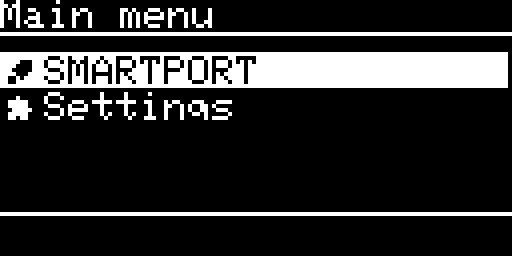
The main menu of the SmartPort emulation - Open SMARTPORT. The SmartPort page shows the four slots, one per line:
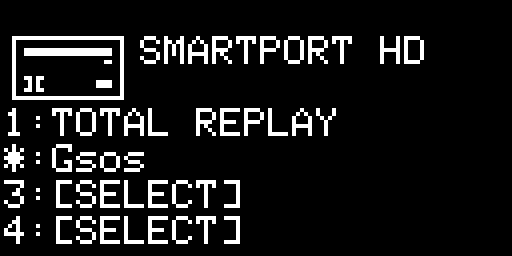
The SmartPort page: four slots, the boot volume marked with a star 1:NAMEis a slot with an image. The name is the file name without its extension, 14 characters at most.3:[SELECT]is an empty slot.- The slot that boots shows
*instead of its number. - UP and DOWN go round the four slots and a fifth position, which selects nothing. The selected line is inverted.
- Each time the Apple II sends a command, the ball in the top right corner turns. The letters
RD,WRorIappear on the line of the unit: read, write or status.
- Work with a slot that holds an image. ENTER opens Smartport Image:
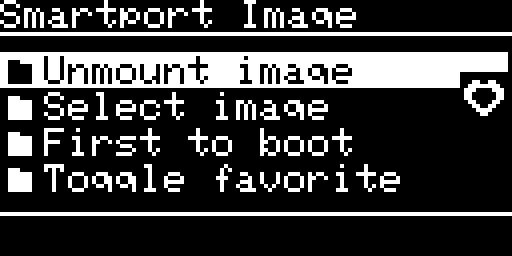
The menu of a slot that holds an image - Unmount image empties the slot.
- Select image chooses another image for the slot (see step 4).
- First to boot makes this slot the boot volume. The board saves the choice at once.
- Toggle favorite adds the image to the favorites, or removes it.
- Fill an empty slot. ENTER on the slot asks Select image from with Favorites and File manager. Pick the file. The board asks
Mounting: NAMEwith YES selected. ENTER on YES saves the path and mounts the image.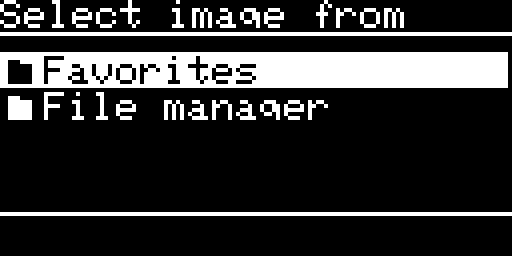
Choosing where to take the image from - Restart the Apple II so that it sees the change (see “Changing an image while the Apple II runs”, below).
If the board cannot mount a file, the OLED shows MOUNT FAILED. With Sound effect on, you also hear two beeps and a falling tone.
Options of this emulation
| Option | What it does | Default |
|---|---|---|
| Boot Img Index | The volume the Apple II boots from (1 to 4). ENTER goes round the values. | 1 |
| Sound effect | A short click for each block the Apple II reads or writes, a click on the keys, and an insert or eject sound when an image comes in or goes out. | off |
| Screen saver | The display goes off after 30 seconds without a key. | off |
| Log to SD | Also writes the log to SMARTDISK.LOG on the card. | off |
| SP resync 2 edges | Changes how the board reads the packets the Apple II sends: it restarts its bit sampler on both edges of the data line, not only on the rising edge. It takes effect when the board restarts. Leave it off unless you have a SmartPort problem that nothing else fixes. | off |
The list also has Clear prefs, Clear favorites and Make filesystem. Every option is explained on the settings page.
4. How it behaves
The boot volume and the unit numbers
- After a bus reset, the Apple II sends an INIT command to each device in turn, and each device takes the next unit number.
- The SmartDisk II answers for four units, whether they hold an image or not. A unit with no image answers as a drive with no disk.
- The boot volume is the slot that gets the first unit number, so the Apple II finds it first and boots from it. The other slots follow in order and wrap round.
- A new Boot Img Index applies the next time the Apple II sends INIT, that is, after a bus reset or a restart of the Apple II.
- After the Smartloader hands over, only one unit holds an image: the image you chose, in slot 1. The saved paths of the four slots are not used. Keep Boot Img Index at 1 when you start through the Smartloader. With another value the Apple II looks first at a slot that is empty.
What a unit looks like to the Apple II
| Item | What the unit answers |
|---|---|
| Name | SMARTDISKHD followed by the unit number, 12 characters |
| Block size and count | 512 bytes; the size of the image in blocks |
| Write protection | The unit says it is write protected when the file is read-only or the 2MG is locked |
| No image | The unit says there is no disk |
| Commands | STATUS, READBLOCK, WRITEBLOCK, FORMAT, CONTROL and INIT, with their extended versions |
Note: FORMAT answers OK and erases nothing. Formatting a SmartPort volume from the Apple II does not clear the image.
Writes
- A write goes straight to the image file. The card holds the block when the Apple II gets its answer.
- A write beyond the end of the image gives an I/O error. A read beyond the end gives a bad block error.
- No setting turns SmartPort writes off. To protect an image, give the file the read-only attribute on your computer, or set the locked flag of a 2MG.
Eject from the Apple II, unmount from the board
- An eject from the Apple II (the Finder, a ProDOS utility) takes the disk out of the unit. The unit then answers that there is no disk until you mount an image from the board.
- Unmount image on the board empties the slot.
Changing an image while the Apple II runs
Each time you mount an image from the menu, the board mounts all four slots again between two commands. The Apple II is not told that an image changed. There is no “disk switched” signal, so a program that keeps a list of volumes (the GS/OS cache, the Finder) does not notice.
Note: Restart the Apple II after you change an image. A unit that the Apple II had ejected comes back at the next mount.
5. Limits and known issues
| Point | What to know |
|---|---|
| Changing an image while the Apple II runs | The Apple II is not told. Restart it (see above). |
| Image size | A ProDOS volume holds at most 65,535 blocks (32 MB). Create disk makes images of that size. |
If something goes wrong, see Troubleshooting, FAQ and the log.
← Previous
Next →
SmartDisk II user documentation · latest firmware · Documentation home