
SmartDisk II · User documentation · Latest firmware
Every setting of the SmartDisk II for each emulation, in the order the OLED shows it: what it does, its values and default, whether it asks first, whether it restarts the board. Also the Settings page of the Apple II, Log to SD and the saved settings file.
← SmartDisk II documentation home · Page 7 of 16
Open the settings from the main menu: Settings. The screen shows only the settings of the emulation that runs. A Disk II board does not show the 3.5 inch options, and so on. The Smartloader shows the settings of the emulation it loads. Pictures of the screen and its keys are in the OLED screens reference. How to use them day to day is in the usage guide.
1. How the Settings screen works
- Press ENTER on a check box to switch it. The board saves the change on the SD card.
- Takes effect says when the board uses the new value. At once means now. Next start means after you restart the board (power it off and on, or change the emulation type).
- Some items ask first. The first ENTER shows a question in the footer line. A second ENTER on the same item does it. UP, DOWN or RET cancel the question.
- Defaults are what the board uses when nothing was saved yet, and after Clear prefs.
- The three boot modes are a radio group: choosing one clears the other two.
HD20 emulation (Macintosh): upcoming. It is not available in this firmware yet. The Emulation type list ends with an entry named HD20 (Mac). Do not choose it: the board does not exchange anything with a Macintosh in that mode yet.
What each option does
| Title on the OLED | What it does | Values, default |
|---|---|---|
| Boot last image | At power up, mounts the last image you mounted and shows its image page. With no last image you see the empty drive page. If the image is refused, you see MOUNT FAILED. | radio. Default: this one |
| Boot last dir | At power up, mounts nothing and opens the file manager in the last folder you used. The drive stays empty until you choose an image. | radio |
| Boot favorites | At power up, mounts nothing and opens the Favorites list. The drive stays empty until you choose one. | radio |
| Emulation type | Opens the list of emulations: Disk II, Smartport HD, Smartloader, Disk 3.5 (and HD20 (Mac), which is upcoming). ENTER on a type checks it and saves it. RET then restarts the board at once if the type is not the one that runs. | Default: Disk II |
| Boot Img Index | The SmartPort partition (1 to 4) that boots first. A star marks it on the SmartPort screen. First to boot in the partition menu sets the same value. | 1 to 4, ENTER goes round. Default: 1 |
| Sound effect | Key click, track and block clicks, the insert, eject and failure sounds. | on / off. Default: off |
| Screen saver | The display goes off after 30 seconds without a key. Any key wakes it, and that key does nothing else. | on / off. Default: off |
| Log to SD | Also writes the log of the board to SMARTDISK.LOG in the root of the card, so that you can send it back when something fails. The board writes only when the emulation is quiet. See section 7. | on / off. Default: off |
| WeakBit | Disk II read: imitates the weak bits of copy protected disks, which WOZ images carry. After a long run of zero bits the board returns bits taken from a fixed pseudo random pattern. | on / off. Default: off |
| SP resync 2 edges | SmartPort: changes how the board follows the data the Apple II sends. It resynchronises on both edges of the signal instead of one. | on / off. Default: off |
| 5.25 write | Disk II: lets the Apple II write to the mounted image. Off: the image looks write protected (WP:Y on the image page). | on / off. Default: on |
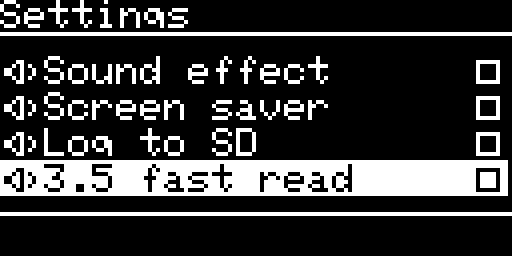
| 3.5 fast read | 3.5 inch drive: sends sectors as the computer asks instead of waiting for the disk to turn. It is faster and does not keep the timing of a real drive. It switches itself off while a MOOF image is mounted. Not shown when 3.5 Mac host is on. | on / off. Default: off |
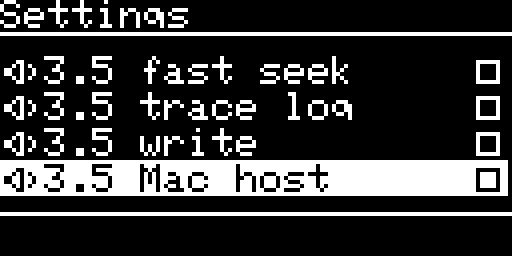
| 3.5 fast seek | 3.5 inch drive: reports a head move as done at once and loads the track when the head stops. Not shown when 3.5 Mac host is on, because that mode always works this way. | on / off. Default: off |
| 3.5 trace log | 3.5 inch drive, a diagnostic: prints the dialogue between the computer and the drive in the log (and in SMARTDISK.LOG when Log to SD is on). Not for everyday use. | on / off. Default: off |
| 3.5 write | 3.5 inch drive: lets the computer write to the image. Off: the disk looks write protected. A locked 2MG image or a read only file stays protected whatever you choose. A Macintosh needs it on to Initialize or to save. | on / off. Default: off |
| 3.5 Mac host | 3.5 inch drive: the board is plugged into a Macintosh (the external floppy port, through a DB-19 cable) instead of an Apple II or IIgs. See the 3.5 inch page. | on / off. Default: off |
| 3.5 SuperDrive | Only with 3.5 Mac host on. Experimental. The drive tells the Macintosh it is a SuperDrive (a 1.44 MB drive) for any disk. It is meant for 1440K images on Macintosh models whose ROM supports a SuperDrive. The board mounts a 1440K image read only. | on / off. Default: off |
| Clear prefs | Deletes the saved settings and restarts the board. Everything returns to the defaults: the settings, the favorites, the last image and folder, the SmartPort volumes and the Smartloader’s last image. Your images stay. | action |
| Clear favorites | Empties the list of favorites. | action |
| Make filesystem | Erases the SD card and sets it up again (FAT32, 32 KB clusters). See section 6. | action |
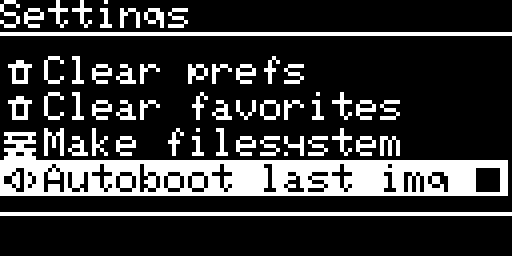
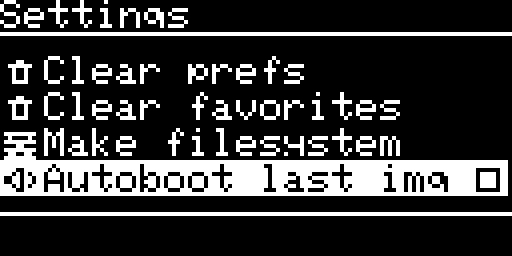
| Autoboot last img | Smartloader only. On: the loader counts down at start and boots the last image. Off: the loader shows the file list at once, with no countdown. Shown last in the list. | on / off. Default: on |
2. Disk II
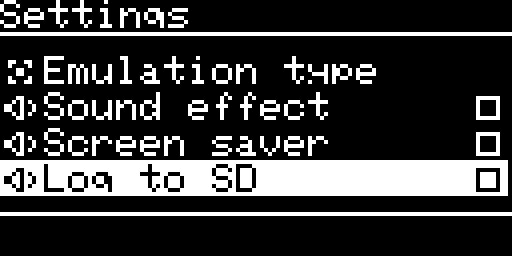
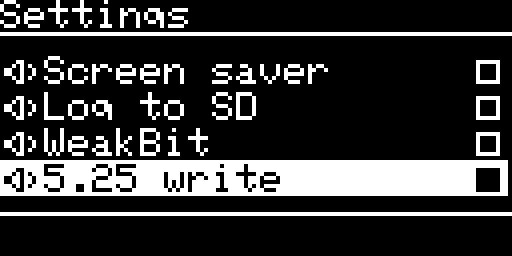
The Disk II emulation runs when the saved emulation type is Disk II. The list has 12 items.
| # | Title on the OLED | Asks first | Restarts the board | Takes effect |
|---|---|---|---|---|
| 1 | Boot last image | no | no | next start |
| 2 | Boot last dir | no | no | next start |
| 3 | Boot favorites | no | no | next start |
| 4 | Emulation type | no | yes, when you press RET after choosing another type | at the restart |
| 5 | Sound effect | no | no | at once |
| 6 | Screen saver | no | no | at once |
| 7 | Log to SD | no | no | at once |
| 8 | WeakBit | no | no | at once |
| 9 | 5.25 write | no | no | at once |
| 10 | Clear prefs | yes: ENTER: clear+reset | yes | at the restart (footer Resetting...) |
| 11 | Clear favorites | yes: ENTER: clear favs | no | at once (footer Favorites cleared) |
| 12 | Make filesystem | yes: its own question | yes, after the result screen | at once |
3. SmartPort HD
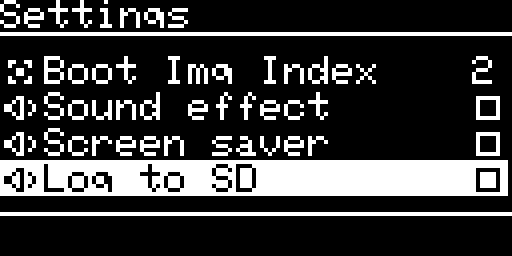
The SmartPort emulation runs when the saved emulation type is Smartport HD. The boot modes do not apply: the SmartPort screen always opens first, and the partitions come from your saved settings. The list has 9 items.
| # | Title on the OLED | Asks first | Restarts the board | Takes effect |
|---|---|---|---|---|
| 1 | Emulation type | no | yes, when you press RET after choosing another type | at the restart |
| 2 | Boot Img Index | no | no | at once |
| 3 | Sound effect | no | no | at once |
| 4 | Screen saver | no | no | at once |
| 5 | Log to SD | no | no | at once |
| 6 | SP resync 2 edges | no | no | next start of the SmartPort emulation |
| 7 | Clear prefs | yes: ENTER: clear+reset | yes | at the restart |
| 8 | Clear favorites | yes: ENTER: clear favs | no | at once |
| 9 | Make filesystem | yes: its own question | yes, after the result screen | at once |
4. Smartloader
The Smartloader is the Disk II drive presenting a loader disk to the Apple II (the Smartloader page). The Settings screen shows the options of the emulation it loads. You choose that emulation from the Apple II side: Disk II, SmartPort and, on a IIgs, the 3.5 inch drive. The boot modes are not shown. When the Smartloader hands over to the emulation it loaded, the menus change to those of that emulation at once, and the tables of sections 2, 3 or 5 apply.
The boot mode you saved still has one effect here: with Boot last dir saved, the file manager on the Apple II side opens in the last folder instead of the root.
Autoboot last img is the last item of every Smartloader list. It is on by default. It works as described in section 1: off means no countdown at start.
4.1 Smartloader loading Disk II images (9 items)
| # | Title on the OLED | Asks first | Restarts the board | Takes effect |
|---|---|---|---|---|
| 1 | Emulation type | no | yes, when you press RET after choosing another type | at the restart |
| 2 | Sound effect | no | no | at once |
| 3 | Screen saver | no | no | at once |
| 4 | Log to SD | no | no | at once |
| 5 | WeakBit | no | no | at once |
| 6 | Clear prefs | yes | yes | at the restart |
| 7 | Clear favorites | yes | no | at once |
| 8 | Make filesystem | yes: its own question | yes, after the result screen | at once |
| 9 | Autoboot last img | no | no | at once |
4.2 Smartloader loading SmartPort images (10 items)
| # | Title on the OLED | Asks first | Restarts the board | Takes effect |
|---|---|---|---|---|
| 1 | Emulation type | no | yes, when you press RET after choosing another type | at the restart |
| 2 | Boot Img Index | no | no | at once |
| 3 | Sound effect | no | no | at once |
| 4 | Screen saver | no | no | at once |
| 5 | Log to SD | no | no | at once |
| 6 | SP resync 2 edges | no | no | next start of the SmartPort emulation (also when the Smartloader hands over to SmartPort) |
| 7 | Clear prefs | yes | yes | at the restart |
| 8 | Clear favorites | yes | no | at once |
| 9 | Make filesystem | yes: its own question | yes, after the result screen | at once |
| 10 | Autoboot last img | no | no | at once |
4.3 Smartloader loading 3.5 inch images (8 items)
No option of the 3.5 inch drive is shown while the Smartloader runs. They appear when it hands over to the 3.5 inch emulation.
| # | Title on the OLED | Asks first | Restarts the board | Takes effect |
|---|---|---|---|---|
| 1 | Emulation type | no | yes, when you press RET after choosing another type | at the restart |
| 2 | Sound effect | no | no | at once |
| 3 | Screen saver | no | no | at once |
| 4 | Log to SD | no | no | at once |
| 5 | Clear prefs | yes | yes | at the restart |
| 6 | Clear favorites | yes | no | at once |
| 7 | Make filesystem | yes: its own question | yes, after the result screen | at once |
| 8 | Autoboot last img | no | no | at once |
4.4 The Settings page on the Apple II
The Smartloader shows the same options on the Apple II screen. Choose SETTINGS in the main menu of the loader. How to use the page is in the usage guide.
The page lists the options of the emulation the loader works with, in the order of the OLED, with the same values. It leaves out Emulation type, Clear prefs and Make filesystem. Use the keys of the board for those. The labels are the OLED titles in capitals, followed by the value (ON, OFF, a number, or GO for an action).
| Option on the Apple II | Disk II target | SmartPort target | 3.5 inch target | What Return does |
|---|---|---|---|---|
BOOT IMG INDEX | – | yes | – | goes to the next number, 1 to 4, then back to 1 |
SOUND EFFECT | yes | yes | yes | switches ON / OFF |
SCREEN SAVER | yes | yes | yes | switches ON / OFF |
LOG TO SD | yes | yes | yes | switches ON / OFF |
WEAKBIT | yes | – | – | switches ON / OFF |
SP RESYNC 2 EDGES | – | yes | – | switches ON / OFF |
CLEAR FAVORITES | yes | yes | yes | asks first: the value shows SURE?. A second Return does it and shows DONE |
AUTO-BOOT LAST | yes | yes | yes | switches ON / OFF |
<- BACK TO MAIN | yes | yes | yes | goes back to the main menu |
- The OLED and the Apple II share the same values. A change on one side shows on the other.
- The cursor stays on the row you changed.
- If an option needs the board to restart, the loader shows
RESTARTINGand restarts the Apple II after the board is back. None of the options on this page needs it at the moment.
5. 3.5 inch drive
The 3.5 inch drive emulation runs when the saved emulation type is Disk 3.5. It serves an Apple II or IIgs, or a Macintosh when 3.5 Mac host is on.
5.1 On an Apple II or IIgs (15 items)
| # | Title on the OLED | Asks first | Restarts the board | Takes effect |
|---|---|---|---|---|
| 1 | Boot last image | no | no | next start |
| 2 | Boot last dir | no | no | next start |
| 3 | Boot favorites | no | no | next start |
| 4 | Emulation type | no | yes, when you press RET after choosing another type | at the restart |
| 5 | Sound effect | no | no | at once |
| 6 | Screen saver | no | no | at once |
| 7 | Log to SD | no | no | at once |
| 8 | 3.5 fast read | no | no | at once |
| 9 | 3.5 fast seek | no | no | at once |
| 10 | 3.5 trace log | no | no | at once |
| 11 | 3.5 write | no | no | at once |
| 12 | 3.5 Mac host | yes: ENTER: host+reset | yes | at the restart |
| 13 | Clear prefs | yes: ENTER: clear+reset | yes | at the restart |
| 14 | Clear favorites | yes: ENTER: clear favs | no | at once |
| 15 | Make filesystem | yes: its own question | yes, after the result screen | at once |
5.2 With the Macintosh host on (14 items)
3.5 Mac host is on and the board has restarted. 3.5 fast read and 3.5 fast seek are not shown: the ROM of a Macintosh checks the speed of the disk, so fast read is off and every head step is reported done at once. Writing needs 3.5 write on.
| # | Title on the OLED | Asks first | Restarts the board | Takes effect |
|---|---|---|---|---|
| 1 | Boot last image | no | no | next start |
| 2 | Boot last dir | no | no | next start |
| 3 | Boot favorites | no | no | next start |
| 4 | Emulation type | no | yes, when you press RET after choosing another type | at the restart |
| 5 | Sound effect | no | no | at once |
| 6 | Screen saver | no | no | at once |
| 7 | Log to SD | no | no | at once |
| 8 | 3.5 trace log | no | no | at once |
| 9 | 3.5 write | no | no | at once |
| 10 | 3.5 Mac host | yes: ENTER: host+reset | yes | at the restart |
| 11 | 3.5 SuperDrive (experimental) | yes: ENTER: drive+reset | yes | at the restart |
| 12 | Clear prefs | yes: ENTER: clear+reset | yes | at the restart |
| 13 | Clear favorites | yes: ENTER: clear favs | no | at once |
| 14 | Make filesystem | yes: its own question | yes, after the result screen | at once |
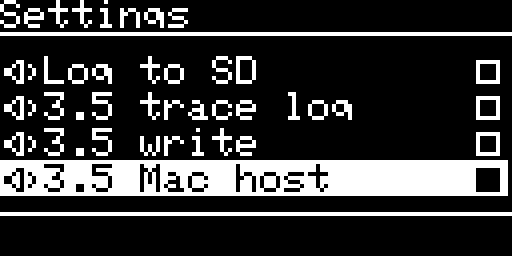
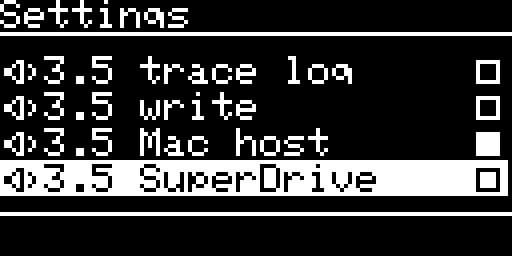
Note. 3.5 Mac host and 3.5 SuperDrive ask first and restart the board, because the board sets up its connection to the computer when the emulation starts.
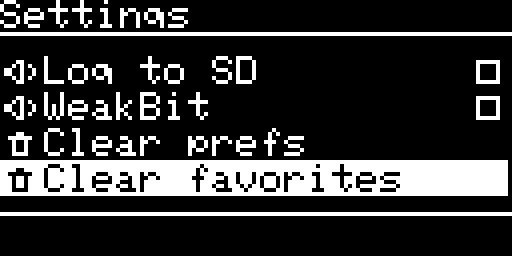
6. The three buttons at the foot of the list: Clear prefs, Clear favorites, Make filesystem
These three are in every emulation, in this order, after the other options.
| Item | How it asks | What you lose | What you keep |
|---|---|---|---|
| Clear prefs | ENTER: clear+reset, then a second ENTER | all the saved settings, the favorites, the last image and folder, the SmartPort volumes, the Smartloader’s last image | the images and every other file on the card |
| Clear favorites | ENTER: clear favs, then a second ENTER | the list of favorites | everything else |
| Make filesystem | the question Erase the SDCARD? (YES / NO, NO by default) and a result screen | everything on the card, images included | nothing: the card is partitioned and formatted again (FAT32, 32 KB clusters), see SD card preparation |
Make filesystem ends on a result screen (Result: OK or Result: ERROR with the reason) that waits for ENTER and then restarts the board. A card smaller than 64 MB, a write protected card or a card that does not answer ends with an error. The screens are in the OLED screens reference.
7. Log to SD
When you switch Log to SD on, the board also writes its log to SMARTDISK.LOG in the root of the card. Use it when something fails and you want to send the log. Each run starts with a line like this one, where NN is the build number:
---- SmartDisk II vX.YY.NN, run started ----
How big it gets. The file grows up to 256 KB. Then the board renames it SMARTDISK.OLD (the older SMARTDISK.OLD is deleted) and starts a new SMARTDISK.LOG. The two files hold 512 KB at most. The board keeps the log from power up, so the start of the boot is in the file when the setting was saved on.
When it writes. The board never writes in the way of the computer. It writes only when the setting is on, the card is free, and the emulation is quiet.
| Emulation | What “quiet” means |
|---|---|
| Disk II | no track waits to be written and the Apple II has been off the drive for 200 ms. With no image mounted the board may write |
| 3.5 inch drive | the computer is not using the drive and has been away for 200 ms, and no write waits for the card |
| SmartPort | no command is running and the bus has been silent for 200 ms |
Lost text. While the computer is busy, the log waits in a small memory of 2 KB (about 20 lines). If that memory fills before the board can write, the new text is dropped. The next write puts a line like this in the file:
---- 640 bytes of log lost: the ring was full ----
The number is an example. It tells you that the file has a gap of that many bytes at that place. A busy computer (a long copy, a boot from a 3.5 inch image) can make such gaps. A quiet board does not.
The memory line. Once a minute the log holds a line about the memory the board uses:
mem: heap peak N of M bytes, stack peak N of 4096 bytes
With Log to SD on, this line is in the file. It shows how close the board came to the end of its memory.
3.5 trace log adds the dialogue between the 3.5 inch drive and its computer to this log. Switch both on when you report a 3.5 inch problem (troubleshooting, FAQ and the log).
8. The saved settings file
Where. The board keeps your settings in /sdiskConfig.json, in the root of the SD card. It is one JSON text of about 1 to 3 KB. The board creates it when you save the first setting. A missing file means every default. You can read it on a computer. Edit it only with the board off, and keep the values as JSON numbers ("soundEffect":1, not "1"): the board does not read a number written as text.
The keys.
| Key | Type | Holds | Written when | Default when missing |
|---|---|---|---|---|
currentPath | text | the folder last listed in the file manager (“” is the root) | each time you list another folder | “” |
lastFile | text | the full path of the last image mounted by the Disk II or the 3.5 inch drive | at each mount. Emptied when you delete that file | none |
bootMode | number | 0 last image, 1 last dir, 2 favorites | Settings | 0 |
emulationType | number | 0 Disk II, 1 SmartPort HD, 2 Smartloader, 3 Disk 3.5 | Emulation type | 0 |
bootImageIndex | number | SmartPort boot partition, 1 to 4 | Settings, First to boot | 1 |
soundEffect | number | 0 / 1 | Settings | 0 |
screenSaver | number | 0 / 1 | Settings | 0 |
logToSd | number | 0 / 1 | Settings | 0 |
weakBit | number | 0 / 1 | Settings | 0 |
smartportResync | number | 0 / 1 | Settings | 0 |
disk2Write | number | 0 / 1 | Settings | 1 |
disk35FastRead, disk35FastSeek, disk35Trace, disk35Write, disk35Host, disk35SuperDrive | numbers | 0 / 1 each | Settings | 0 |
smartloaderAutoBoot | number | 0 / 1: Autoboot last img | Settings, on the OLED or on the Apple II | 1 |
smartport_vol00 to smartport_vol03 | text | the image of each SmartPort partition (“” is empty) | when you answer YES to a mount in SmartPort. Emptied by Unmount image, and when an image is refused at start | “” (empty partition) |
smartloaderEmulationType | number | the Smartloader’s target: 0 Disk II, 1 SmartPort, 3 3.5 inch | when you change it on the Apple II | 0 |
smartloaderLastBootImage | text | the last image booted by the Smartloader | when the Smartloader boots an image | none |
smartloaderLastBootEmulationType | number | the target that image was booted under (the last image is offered for that target only) | with the image | none |
favorites | list of {"filename": path} | the favorites, at most 10 | when you add, remove or clear one | empty list |
Saving. The board saves a change as soon as the emulation allows it. Several changes made together make one write of the whole file.
Note. Do not remove the power or the card at the moment you change a setting. The board rewrites the whole file, and a power cut during the write can leave an empty or short file. The next start then uses the defaults. If the board cannot read the file at start (card error, damaged file), it uses the defaults for that run and does not overwrite the file until the next change you make.
← Previous
SmartDisk II user documentation · latest firmware · Documentation home