
SmartDisk II · User documentation · Latest firmware
Something does not work? Start with the quick checks, find your symptom (blank display, Apple does not boot, image refused, SD card messages, Macintosh does not see the drive, no sound), read the questions people ask, and learn how to collect a log and send it.
← SmartDisk II documentation home · Page 14 of 16
This page helps you when the SmartDisk II does not do what you expect. Start with the quick checks, then look for your symptom, then read the questions people ask. The last sections show how to collect a log to send with a report.
Related pages: hardware and installation, SD card preparation, firmware update, usage guide, OLED screens, settings, Disk II, SmartPort, Smartloader, 3.5 inch, IIgs and Mac, Create disk and image formats, compatibility, release notes.
HD20 emulation (Macintosh): upcoming. It is not available in this firmware yet. The menus already list an HD20 (Mac) entry under Emulation type. Do not select it: a Macintosh cannot use it yet. If you selected it by mistake, open Settings > Emulation type, press ENTER on the emulation you want, then press RET. The board restarts with that emulation.
1. First checks
Do these before anything else. Most problems end here.
| # | Check | Why |
|---|---|---|
| 1 | Power. The board takes its power from the Apple drive connector through the jumper marked 5V, or from its own USB connector. Use one source at a time. Never connect the ST-Link programmer at the same time as USB or the Apple II. | A board that is short of power resets, loses the display or stops answering the card. The voltage regulator is fragile when two sources meet. |
| 2 | The card. Is it pushed in until it clicks? Is it formatted FAT32 with 32 KB clusters (see 4.3)? Is it a card of a known brand? | A card that is out gives SD EJECTED. A card with another cluster size gives CLUSTER NOT 32K. Some cards are very slow, and a slow card makes loading slow. |
| 3 | The cable. Is the ribbon pushed firmly into the board connector and into the Apple connector? Is the computer switched off while you plug it? | A loose cable gives a drive that is sometimes found and sometimes not. The hardware page shows the connection for each machine. |
| 4 | The firmware version. It appears on the splash screen, at the foot of the Image menu, at the foot of the Directory options screen and in the first line of each run of the log. Say it in every report. | The latest firmware fixes many of the problems below. The bootloader supplied with this firmware is v0.21; an older v0.15 bootloader causes problems with the IIgs SmartPort. |
| 5 | Which emulation runs. Open Settings > Emulation type: Disk II, Smartport HD, Smartloader or Disk 3.5. | The main menu, the file list and the Settings list show what the running emulation can use. A 3.5 inch image is not listed under Disk II. A .dsk is not listed under SmartPort. |
| 6 | Is the display only asleep? With Screen saver on, the display goes off after 30 seconds without a key. | The first key press only wakes the display and does nothing else. On the XL board, turning the knob also wakes it. |
| 7 | Restart the Apple II, not only the board. | After you change an image on a running SmartPort system the Apple II may keep the old one (see 3.13). |
2. What the OLED can say
The OLED is 128 x 64 pixels: a title line and four lines of text. This section lists the messages that are not plain menu items.
2.1 The Warning screen
| Message | What it means | What to do |
|---|---|---|
| SD EJECTED | The board sees no card: the card is out, not fully pushed in, or its contact is dirty. The screen also appears at power up with no card. No key leaves this screen. The emulation goes on, but nothing is listed, mounted or saved until the card is back. | Push the card in. The screen changes to SD CARD: IS BACK, ENTER: restart. Press ENTER. The board does not restart by itself, so it never cuts off the Apple II or the Macintosh in the middle of an operation. A failure sound plays when the card is pulled out (with Sound effect on). |
| SD INVALID (footer RET: back) | The card is in but the board cannot mount it at power up: it is not formatted, it is exFAT, or it is damaged. | Press RET, then use Settings > Make filesystem (see 4.3). It erases the card. The failure sound plays. |
| CLUSTER NOT 32K (footer RET: back) | The card mounts but its clusters are not 32 KB, so no image can be read. | Press RET, then use Settings > Make filesystem. The failure sound plays. |
| MOUNT FAILED (footer RET: back) | The board refused the image you chose. The slot stays empty. A failure sound plays (with Sound effect on). | Press RET to go back to the list. Section 3.5 gives the reasons. |

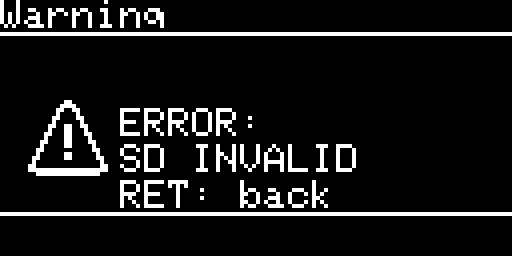
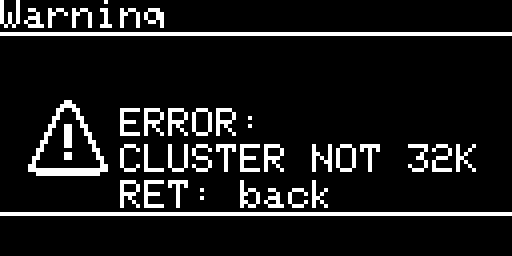
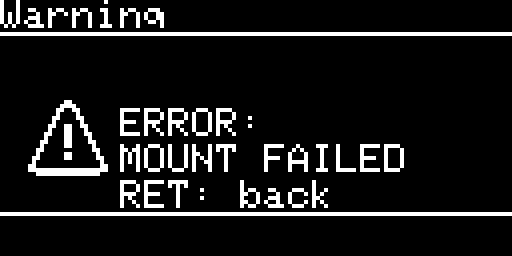
Note: a card message stays on the screen when a refused mount follows it. The card is the cause, so fix the card first.
2.2 Other lines you can meet
| Where | Text | Meaning |
|---|---|---|
| Image page | Insert a disk / ENTER: choose image | No image is mounted, or it was ejected. A drawn 5.25 or 3.5 inch drive is shown. ENTER opens the file list. RET goes back to the main menu. |
| Image page | RD, WR, ER next to the track | The last access of the Apple: read, write, or ER, which means the track could not be read or the write did not reach the image. |
| Image page | type: ERR | The image is of a type the page does not know. |
| Image page | WP:Y | The image is write protected for the Apple (see 3.8). |
| File list footer | Empty | The folder holds no file the running emulation can mount. Otherwise the footer shows a counter such as 3/12, or n/255+ when the folder holds more than 255 entries. |
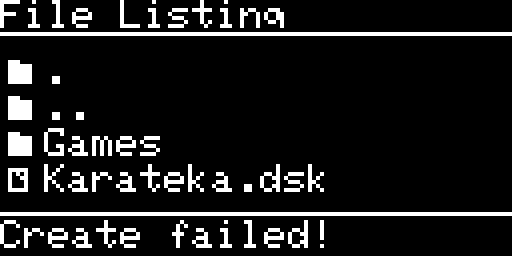
| File list footer | Create failed! | The last Create disk or New folder did not complete. Shown for that listing only. |
| File list footer | Folder exists! | New folder: a folder with that name already exists. |
| File list footer | Delete failed! | Delete image or Delete folder did not complete: the file is read-only, the card is protected, or the folder is the root. |
| File list footer | List error | The folder could not be read (card error). |
| Directory options footer | Folder not empty, Not the root | Delete folder works on an empty folder only, and never on the root of the card. |
| Favorites | No favorite | The list is empty. It holds 10 favorites at most. |
| Settings footer | ENTER: clear+reset, ENTER: clear favs, ENTER: host+reset, ENTER: drive+reset | The option asks you to press ENTER a second time. Any other key cancels. |
| Settings footer | Resetting…, Favorites cleared | The option was done. |
| Make filesystem | Please wait… / Formatting SDCARD, then Result: OK or Result: ERROR with a reason, then [ENTER] to reboot | See 4.3. |
| Create disk | Please wait… | The image is being written. |
| Whole screen | HARD FAULT or ERROR HANDLER, with lines PC, LR, CFSR, HFSR, BFAR/MMFA | The firmware stopped. The board stays on this screen. Switch the board off and on again. Then send the lines on the screen (a photo is enough) with the firmware version and what you were doing. |
3. Problems by symptom
Each entry gives what you see, the likely causes and what to do. When the log shows the cause, the entry names the line to look for (see section 7).
3.1 Nothing on the OLED
| Cause | What to do |
|---|---|
| The screen saver turned the display off. | Press a key. |
| No power. | Do check 1 of section 1. |
| The OLED module has its power pins the other way round. | Some OLED modules have VCC and GND swapped. Check the pin order of your module against the board before you fit it. |
| The display does not answer on its bus. | At power up the splash is skipped when nothing answers. The board looks for a lost display every 5 seconds, so a display that comes back is found again. The log says ssd1306_Init I2C device not ready, then ssd1306_Reconnect: display answers again. |
| An Apple IIe boots slot 6 with an empty card and the display looks frozen. | The firmware handles this case: the Disk II emulation is no longer busy when nothing is mounted. Update the firmware. |
3.2 The OLED stops and a power cycle brings it back
The Apple II is an electrically noisy place, and a glitch can leave the display bus stuck. The firmware now frees the bus before every retry, gives up on a transfer that lasts more than 100 ms, looks for a lost display every 5 seconds and clears the bus once at power up. A stopped display should come back by itself within a few seconds.
- The log shows each recovery:
display bus: fault N, bus recovered before the retry (SDA high)or(SDA low). SDA low means the display was holding the line. When the display answers again the log saysssd1306_Reconnect: display answers again. - If the display still stays dark, collect the log (section 6) and send the lines above with the time they appeared. Add the board revision and the power source.
- A screen can also lag without being stopped: the board sends nothing to the display while the card transfers data or the Apple waits for a track.
3.3 The card is not read
- Push the card in until it clicks. The screen says SD CARD: IS BACK. Press ENTER to restart the board.
- The card is in but you see SD INVALID, an empty list or errors: the file system is wrong. Use Make filesystem (4.3). The log says
not able to mount filesystemat power up, orError mounting sdcard N. - You see CLUSTER NOT 32K, or images are refused: the clusters are not 32 KB. The log says
empty file, or SD card not formatted with 32KB clusters. Windows 10 and 11 do not format the card the right way. Use Make filesystem on the board. On Linux you can usemkfs.fat -F 32 -s 64 /dev/sdX. - The card answers slowly or not at all: the log shows
Error HAL_SD_ReadBlocks_DMA error:N retry:NorError HAL_SD_WriteBlocks_DMA error:N retry:N. The board waits at most 500 ms for a command and 5 seconds for an image transfer, then recovers the card. Try another card of a known brand. If the error is always on the first write after power up, send the log: a supply that sags when the card starts to write looks the same. - The card was formatted on a computer: the board wants one MBR partition, FAT32 (FAT16 on a card of 2 GiB or less), with 32 KB clusters. The board’s own format also works on cards over 32 GiB.
3.4 An image is not in the list
The list shows only the files that the running emulation can mount.
| Emulation | Extensions listed (any case) |
|---|---|
| Disk II (and the Smartloader when it loads Disk II images) | po, dsk, do, nic, woz |
| Disk 3.5 | 2mg, po, img, dc42, dc, moof |
| SmartPort (and the Smartloader when it loads SmartPort images) | po, 2mg, hdv |
The list also hides:
- names that start with a dot, for example the
._Game.dskcompanion files that macOS leaves on the card; - files with the hidden or the system attribute, and file names of three characters or fewer;
- entries beyond the first 255 of a folder. The list shows the first 255 in alphabetical order, so split big folders.
A Smartloader list follows the emulation the loader hands the image to (Disk II by default).
Names with characters the display font does not have show as ?. Plain names with Western European letters are the safest. A folder path longer than 256 characters, or an image path longer than 320, is refused (the log says path too long or image path too long).
3.5 MOUNT FAILED, or the image is refused
The log says why. Press RET to return to the list.
| Log line (start) | Meaning |
|---|---|
empty file, or SD card not formatted with 32KB clusters | The file is empty, or the card has the wrong cluster size (4.3). |
not a woz file, file too short for a WOZ header, info chunk is not valid, tmap chunk is not valid, trks chunk is not valid | The WOZ file is damaged or not supported. |
not a 5.25 inch disk (disk type) | The WOZ file is a 3.5 inch disk. |
dsk: N bytes is not the size of a 5.25 inch disk image (143360 or 163840) | A DSK, DO or PO file of the wrong size for Disk II. |
nic: N bytes, a disk is M | A NIC file of the wrong size. |
2mg: ... (header not readable, data offset, blocks announced) or Error: not a 2mg file | The 2MG header does not agree with the file. |
not a DiskCopy 4.2 file, DiskCopy 4.2 file shorter than its header says | The .dc42 file is damaged. |
disk35: ... has N blocks, an 800K disk has 1600 and a 400K disk 800 (1440K: 2880, with a Macintosh host) | The file is not a 3.5 inch disk size. A 1440K image needs a Macintosh host (3.10). |
disk35: ... is not in ProDOS block order | A 2MG in another sector order. |
moof: ... | A MOOF file that is damaged, or is a 1.44 MB (MFM) or Twiggy disk. The board reads 400K and 800K GCR MOOF files. |
2MG of nibbles can not be a SmartPort volume | SmartPort needs block images, not nibble images. |
2MG without a block | The 2MG has a header and no data. |
File must be an unadorned ProDOS order image with no header! ... its size must be an exact multiple of 512! | The .po or .hdv for SmartPort has a header or a wrong size. |
disk35: ... cannot be read from the card (32KB allocation unit needed) | The card has another cluster size. |
a track is beyond what the cluster table reaches | A WOZ or MOOF file that is larger than the board can map (a WOZ over 1.25 MB). |
What to do: try the same image in another tool, try another copy, check the card format, then send the log line.
3.6 The image is mounted but the Apple does not boot
Work through these in order.
- Is it the right emulation for the machine and the image? A Disk II image needs the Disk II emulation on a machine that boots from the drive (slot 6 or the drive port). A SmartPort
.poneeds SmartPort. A 3.5 inch image needs the Disk 3.5 emulation on a IIgs, or on a Macintosh. See compatibility. - Look at the Image page. Check
type,TRACK,WPand the label. If the RD label never appears, the Apple does not reach the drive: check the cable and the connection. If you see ER, the log saystrack N could not be read(Disk II) ordisk35: cylinder N not read. - IIgs speed. The Disk II emulation can fail when the IIgs runs in fast mode. Set the speed to Normal in the Control Panel. The Smartloader does this by itself before it starts a Disk II image.
- A cold start fails but a reset works. The bootloader takes a moment to start, and the Apple II may begin its drive procedure before the board is ready. Reset the Apple II.
- A protected WOZ game does not run. Turn on WeakBit in Settings (Disk II). The drive then returns random bits after a run of zero bits, as a real drive does. Games known to need it include The Print Shop Companion and Commando. On the Image page,
OT:is the bit timing the WOZ file asks for (32 is 4 microseconds), andCL,SYNandVcome from the WOZ header. Report the title, the WOZ version and the firmware version if it still fails.
3.7 A disk works in a real drive but not here
- The image is not what the real disk was. A
.dskor.pofile has no timing, no half tracks and no weak bits. Only a WOZ file carries them, so use the WOZ file of the title when there is one. - Copy protection. The compatibility page lists the protection schemes that were tested.
- The write option. A disk that writes to itself (save games, a protection that writes a track) needs the write option on (3.8).
- An accelerator. Writes that fail on one machine only: see 3.8, last point.
- The IIgs runs in fast mode (3.6, point 3).
3.8 A write does not stick
Several things can refuse a write. Check them in this order. The Image page shows WP:Y when the Apple sees the image as write protected.
| Emulation | Setting | Default | Other causes of write protection |
|---|---|---|---|
| Disk II | 5.25 write | on | With the option off, every image looks write protected. The file has the read-only attribute on the card, or a WOZ header says it is write protected. The Smartloader image is never protected. |
| 3.5 inch (IIgs) | 3.5 write | off | With the option off, the drive reports a write protected disk. The 2MG is locked (a flag in its header), the MOOF header says write protected, or the file is read-only. |
| 3.5 inch (Macintosh) | 3.5 write and 3.5 Mac host | write off, host off | You need both. 3.5 Mac host asks for a second ENTER and restarts the board, because the board sets up its connection when it starts. If the Macintosh says “unreadable disk” and the setting is on, check that the board restarted: the log says host:Macintosh. |
| SmartPort | none | writes allowed | A read-only file, or a 2MG with the locked flag, is mounted read-only and reports itself locked. A write then gets an error. |
Other causes:
- The log shows write errors. Disk II:
write of track N failed, one more try, thenwrite of track N failed, given up. DSK:dsk write: the card did not answer for track N. WOZ:woz write: track N could not be written. MOOF:moof write: track N not written. 3.5 inch:disk35: block N not written, ordisk35: write cyl C side S: N sectors decoded, E errors in it (...). - Errors in the Smartloader (
ERR:E2), bad sectors, on one machine only. A CPU accelerator can change the timing of the write loop by one cycle, which adds or drops a bit. The board gives correct writes on a stock IIe and on a IIgs with its original CPU. If your machine has an accelerator, switch it off or set it to 1 MHz and try again.
3.9 The IIgs boots the wrong device, or does not reach the Smartloader
- The IIgs ROM 03 asks the SmartPort bus before it boots a 5.25 inch disk. The Disk II emulation ignores its enable line during that question, as a real drive does, and the IIgs then goes on to boot. If a boot still stops on a IIgs, reset the board, and send the log.
- Which device boots depends on the startup slot in the IIgs Control Panel and on what the board presents, which is the running emulation. Check Settings > Emulation type and the main menu entry.
- For a 3.5 inch image chosen in the Smartloader, the loader mounts the image and restarts the IIgs, which then boots from its 3.5 inch drive.
- A SmartPort card such as the Liron Reborn: see the questions in section 5.
- After a bootloader update the IIgs SmartPort misbehaves: use bootloader v0.21.
3.10 The Macintosh does not see the drive, Initialize fails, or the Mac ejects the disk
The Macintosh SE (external 800K drive port through a DB-19 cable) is the machine the Macintosh mode was built and tested on. On it, the drive is seen, an image is read, a blank 800K image can be initialized, and an HFS image made by Create disk is recognised. A Macintosh whose ROM supports a SuperDrive may use the experimental 3.5 SuperDrive setting (see below). Other models may behave differently. If you try one, send a log.
Set-up checklist
- Choose Settings > Emulation type > Disk 3.5.
- Turn on 3.5 Mac host. Press ENTER a second time when the footer says ENTER: host+reset. The board restarts.
- To write to the disk, turn on 3.5 write. The image must not be locked or read-only.
- Use an image the Macintosh can read. A ProDOS image is unreadable to a Macintosh by design. Use an HFS image made by Create disk, or a real Macintosh disk image (400K or 800K
.dc42,.2mg,.po, or an 800K or 400K.moof). See the Create disk page. - Start with the internal drive empty, the cable on the external floppy port, and the image mounted before you switch the Macintosh on.
With a Macintosh host, the 3.5 fast read and 3.5 fast seek options are hidden: the drive always answers as the Macintosh needs.
| Symptom | Cause | What to do |
|---|---|---|
| The Macintosh shows the disk with a question mark, or does not see the drive. | The wrong emulation, 3.5 Mac host off, the board not restarted after you turned it on, or an image the Macintosh cannot read. | Go through the checklist. For a log, see 7.4. |
| Initialize fails. | The firmware is old. Update to the latest. | If it still fails, collect a log as described at the end of 7.4: one failed Initialize, with 3.5 Mac host, 3.5 write and 3.5 trace log on. |
| The Macintosh ejects the disk. | The Macintosh ejects a disk it cannot use. | Check the image type and that 3.5 write is on. The log’s host wrote line (7.4) shows what the Macintosh did before it ejected. |
| After the eject the OLED shows Insert a disk. | A host eject shows the empty drive page. | Press ENTER to choose an image. |
| A 1440K image is refused. | A 1440K image needs a Macintosh host. | Turn on 3.5 Mac host. |
3.5 SuperDrive (experimental). With 3.5 Mac host on, Settings also lists 3.5 SuperDrive. It makes the drive a SuperDrive, so a Macintosh whose ROM supports a SuperDrive can read 1.44 MB images. Turn it on, then press ENTER a second time when the footer says ENTER: drive+reset. The board restarts. Create disk then offers an HFS 1440K .img. 1.44 MB images are read-only. If the Macintosh does not accept the drive, turn the setting off again.
3.11 Slow loading
| Emulation | Cause | What to do |
|---|---|---|
| Any | A card with poor read and write speed. | Use a card of a known brand. |
| 3.5 inch (IIgs) | Each block can need a seek and a motor start. | Optionally turn on 3.5 fast read and 3.5 fast seek. They are experimental and are hidden with a Macintosh host. |
| Disk II | A WOZ track is read from the card each time the head moves. | Use a faster card. |
| Any | Logging slows the board a little. | Turn 3.5 trace log off after a test. Log to SD writes only when the emulation is quiet. |
3.12 A power cut lost the settings
- Where the settings are. One file,
sdiskConfig.json, at the root of the card. It holds the options, the favorites, the last image and folder, and the SmartPort partitions. The board rewrites it when one of these changes. - What goes wrong. The board writes the file in one pass. If the power is cut during the few sector writes of that pass, or the card fails or is full, the file is left empty or short.
- What you see. The log says
config: the file could not be parsed: it is left as it is, the defaults are used. The board runs on the defaults: no favorites, no SmartPort partitions, the Disk II emulation. The damaged file stays on the card until the next save replaces it. - What to do. Set your options and favorites again. To start clean on purpose, use Clear prefs (4.1).
- To lower the risk, do not switch the power off while you change a setting, mount an image or enter a folder in the Smartloader.
- A card with many long favorites that was last written by firmware up to v0.80.45 can also start with the defaults: those versions cut the file at 1024 bytes.
3.13 SmartPort
- Checksum errors, hangs, a device that stops answering. The SmartPort timing is the most sensitive part of the board. Try SP resync 2 edges in Settings (SmartPort). It applies when the SmartPort emulation starts, so restart the board after you turn it on. The log lines to look for are
Incomming command checksum error,SmartportReceivePacket timeout errorandBad Checksum on write. Send the log with the machine, the card and the image. - After you change an image on a running system, the old disk still appears. The board does not tell the Apple II that the disk changed. Restart the Apple II after you change an image.
- SmartPort options are missing from Settings. The Settings list follows the running emulation. With the Smartloader, the SmartPort options appear only while the loader loads SmartPort images.
- SmartPort stays dead after a hand-over from the Smartloader. Reset the board.
3.14 No sound, or sounds you do not expect
| What you see | Cause and remedy |
|---|---|
| The buzzer is silent. | Sound effect is off. Turn it on in Settings. |
| No eject or insert sound. | These sounds play only with Sound effect on, and only when an image leaves or enters the drive. |
| An endless buzz when you pull the card. | Fixed in the latest firmware: with the card out, the disk clicks stay silent. Update the firmware. |
| A short falling beep. | The failure sound: an image was refused, or the card has a problem (2.1). |
| The first key press does nothing. | The display was asleep (Screen saver). |
3.15 The Settings page of the Smartloader on the Apple II
The Smartloader shows a SETTINGS row in its main menu. The page lists the options of the OLED Settings for the running emulation. It does not list Clear prefs, Emulation type or Make filesystem.
- Press RETURN on an option to change it. The cursor stays on the changed row.
- The Smartloader shows RESTARTING. The option you changed makes the board restart. Wait a few seconds: the board restarts and the Apple II reboots by itself.
- The Smartloader goes straight to the list, without the countdown. The option AUTO-BOOT LAST (Autoboot last img on the OLED) is off. It is on by default. With it on, the loader boots the last image after the countdown unless you press a key.
- An option is missing. The Settings list follows the emulation the loader loads: see 3.13.
3.16 Other things you may meet
| What you see | Cause and remedy |
|---|---|
The device freezes after you mount a .po or .woz, and stays frozen after a restart. | Delete sdiskConfig.json from the card, or use Clear prefs if you can reach it. If it happens again, report the file, its size and the emulation. |
Names show ?. | The display font has no glyph for that character (3.4). |
| The board misbehaves while the ST-Link is connected. | Never connect the ST-Link together with USB or the Apple II. |
| The knob of the XL board does nothing. | Turn it once to wake the display, then turn again. Clockwise moves DOWN, counter-clockwise moves UP. ENTER and RET are push buttons. |
4. Clear prefs, Clear favorites, Make filesystem
All three are in Settings. Each asks first: the first ENTER asks, the second ENTER on the same item does it. Any other key cancels.
4.1 Clear prefs
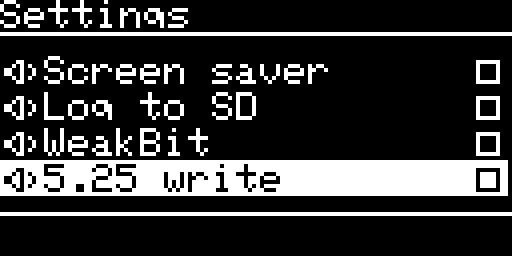
- Open Settings, select Clear prefs and press ENTER. The footer says ENTER: clear+reset.
- Press ENTER again. The board deletes the configuration file
sdiskConfig.jsonand restarts (Resetting…).
You lose the options, the favorites, the last image and folder, and the SmartPort partitions. Your images stay. After the restart everything is at its default: Disk II emulation, 5.25 write on, every other option off, except Autoboot last img, which is on.
If the card does not answer, the file stays in place (the log says config: the card does not answer, the file is not deleted).
4.2 Clear favorites
Open Settings, select Clear favorites and press ENTER twice. The board empties the list of favorites (at most 10) and shows Favorites cleared. The rest of the configuration stays.
4.3 Make filesystem
Use it when the card is not read, the images are refused for the cluster size, or the card is damaged. It erases everything on the card.
- If you can, copy the content of the card to a computer.
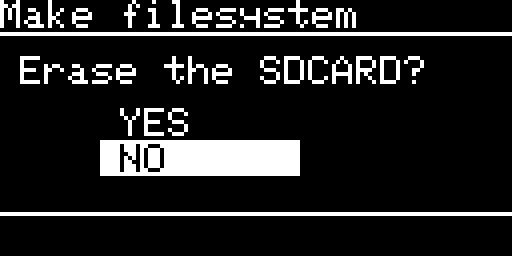
- Open Settings, select Make filesystem and press ENTER. The screen asks Erase the SDCARD? with YES and NO. The answer starts on NO.
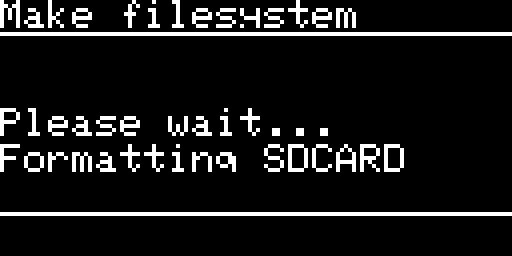
- Choose YES. The screen shows Please wait… / Formatting SDCARD. Do not remove the card and do not switch the power off.
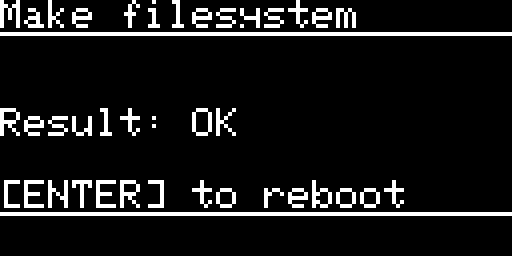
- The screen shows Result: OK or Result: ERROR, and for an error the reason, then [ENTER] to reboot. Press ENTER. The board restarts with the new file system.
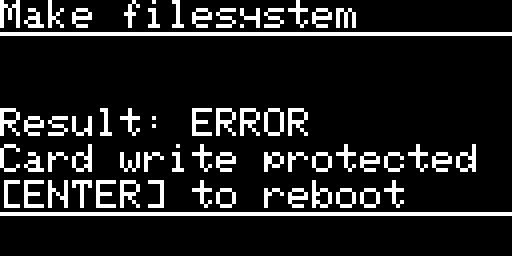
The format clears the old partition tables, makes one MBR partition with FAT32 and 32 KB clusters (FAT16 on a card of 2 GiB or less), gives the volume the label SmartDiskII, and then checks the result by writing and reading back a test file.
| Reason on the OLED | Meaning | What to do |
|---|---|---|
| No SD card | The card did not start, or it was removed. | Push the card in again and try again. |
| Card write protected | The lock switch of the card is on, or the card refused writes. | Slide the lock switch to unlocked. |
| Card too small | The card is under 64 MB. | Use another card. |
| Card error | A transfer failed. The card has no partition table now, so it has no file system. | Run Make filesystem again. If it fails again, change the card. |
| Format refused | The format function refused the card. | Format it in a computer, then run Make filesystem again. |
| Verify failed | What the board read back is not what it wrote. The card is formatted but cannot be trusted. | Try again, then try another card. |
| Not 32KB clusters | The card reports another cluster size. | Try again. |
| Card too slow | The format did not finish within 10 minutes. | Use another card. |
| Bad parameter | An internal error. | Send the log. |
If the power is cut during the format, the card ends up with no partition table, never with an old table in front of a half-written volume. The board then starts with not able to mount filesystem or SD INVALID, and Make filesystem works again from Settings. The log shows makeSDFS error N text for a failure.
5. FAQ
Can I use one card for two machines? Yes. The card is plain FAT32. The settings, the favorites, the last image and the SmartPort partitions live on the card (sdiskConfig.json), so they travel with it. A card that moves between a IIgs and a Macintosh keeps the option 3.5 Mac host. Change it with the board’s own setting: the board restarts.
How many images can I have? The size of the card is the limit. The OLED list shows the first 255 entries of a folder, in alphabetical order, so keep each folder under that. The list of favorites holds 10. Paths are limited to 256 characters (folder) and 320 (image).
Can I make folders? Yes. In the file list, open the Directory options and choose New folder. Type the name with the name editor. Delete folder asks first (the footer says ENTER: delete folder); press ENTER a second time to delete the listed folder. It works on an empty folder only, never on the root of the card.
Which cards work? Use a card of a known brand. It must be FAT32 with 32 KB clusters. Make filesystem prepares a card for you.
Does it write to my images? Yes: on the Disk II (5.25 write, on by default), on the 3.5 inch drive (3.5 write, off by default) and on SmartPort. Always keep a copy of an image you care about. The Create disk and image formats page lists which formats you can write.
Can I make new images? Yes. Use Create disk in the Directory options of the file list. You can make blank images, formatted ProDOS volumes, bootable ProDOS or DOS 3.3 disks, HFS volumes for the 3.5 inch drive, and MOOF files for the 3.5 inch drive. See the Create disk page.
Does it handle copy protection? Yes, for the schemes listed on the compatibility page.
Can I use it as a hard disk? Yes. The SmartPort HD emulation serves up to four ProDOS block images (po, 2mg, hdv) as partitions. See SmartPort.
Can I use it with a Macintosh? Yes, as an external 3.5 inch drive on the Macintosh SE, read and write, with 3.5 Mac host on. MOOF images from Applesauce work too. See 3.10 and the 3.5 inch page.
Does it work on a Macintosh Plus, or a Macintosh II? The Macintosh SE is the machine the Macintosh mode was built on and tested on. For other models, see compatibility, and send a log if you try one.
Does it work on a IIc, a IIe, a II+ or a IIgs? See the compatibility page.
Is there an Apple HD20 emulation? HD20 emulation (Macintosh): upcoming. It is not available in this firmware yet. Ignore the HD20 (Mac) entry in Emulation type until it is announced.
What do the keys do on the empty drive page? ENTER lists the folder. RET goes back to the main menu.
What are the controls of the XL board? The XL board has a rotary knob in place of the UP and DOWN keys. Turn it clockwise for DOWN and counter-clockwise for UP. ENTER and RET stay as keys. The XL board has a 1.54 inch display and its own firmware image: flash the XL image, not the standard one.
My Liron Reborn does not boot the SmartDisk II. A Liron Reborn must have its DIP switches set to Liron mode: SW1 off and SW2 on, with the SmartPort device on the PRIMARY connector. With the card in Disk II mode the Apple II boots like a Disk II controller and never asks the SmartPort bus. Set Emulation type to Smartport HD on the board.
On my unenhanced Apple IIe the SmartPort card does not start by itself. The autostart ROM of an unenhanced IIe boots only Disk II signature cards. A SmartPort card (Liron, or Yellowstone in SmartPort mode) needs PR# and the slot number, typed after power up (for example PR#5). To see which IIe you have, type PRINT PEEK(64448): 234 is an unenhanced IIe, 224 an enhanced one.
The Smartloader shows RESTARTING. An option you changed on the Apple II SETTINGS page makes the board restart. The board restarts and the Apple II reboots by itself. Wait a few seconds.
The Smartloader does not count down and boot the last image any more. The option AUTO-BOOT LAST is off (Autoboot last img on the OLED). Turn it on from the Apple II SETTINGS page or from the OLED.
Is there a log? Yes: serial on the UART and, if you turn Log to SD on, a file on the card. See section 6.
Can I damage the board with the log connector? Use a 3.3 V adapter and do not connect its 5 V pin: the board has its own power. See 6.1.
6. Collecting a log
Send a log with every report that is not obvious. There are two ways. The serial log is complete and immediate. The file on the card is for a board that is not on your bench.
6.1 The serial log (UART)
The board prints its log on a serial output: pin PA15 is the transmit line, at 460800 baud, 8 data bits, no parity, 1 stop bit, no flow control, at 3.3 V levels. Each line looks like 12345 INFO file.c:123: message. The first number is the milliseconds since power up.
On the standard board (revision 9) the output is the 3-pin header J4 “UART”: pin 1 is TX (the log), pin 2 is RX and pin 3 is GND. Check the marking on your board before you connect.
- Use a 3.3 V USB-serial adapter. Connect its GND to J4 pin 3 and its RX to J4 pin 1 (TX). The board never needs your adapter’s TX, so leave it unconnected. Do not connect the 5 V of the adapter. The board takes its power from the Apple II or from its own USB, as usual.
- Open a terminal program at 460800 baud, 8N1, no flow control. For example
screen /dev/tty.usbserial-XXXX 460800on macOS,picocom -b 460800 /dev/ttyUSB0on Linux, or PuTTY on Windows. - Switch the board on after the terminal is open. The start-up lines are the most useful.
- Do the thing that fails.
- Save the terminal output to a text file.
- Do not connect the ST-Link while the board is powered from USB or from the Apple II.
6.2 Log to SD
Use this when the board sits in the computer and you cannot attach a serial adapter.
- Open Settings, select Log to SD and press ENTER. The box is checked. The setting is saved and applies to all the emulations.
- Use the board as usual and reproduce the problem. Everything the serial log prints is also added to the file
SMARTDISK.LOGin the root of the card. - When the problem has happened, wait about 15 seconds, then switch the board off.
- Take the card out. Copy
SMARTDISK.LOGand, if it exists,SMARTDISK.OLDto a computer.
What to know:
- When the board writes. The text waits in memory. The board writes it when 512 bytes wait, or when something has waited 10 seconds, and only when the emulation is quiet: the Disk II with no track waiting and the Apple away from the drive for 200 ms, the 3.5 inch drive with the host away for 200 ms and no write waiting, SmartPort with no command running and the bus silent for 200 ms. A failed write is tried again 30 seconds later.
- The last seconds before a freeze or a power cut can be missing. For a crash, use the serial log.
- Two lines to look for.
---- SmartDisk II vX.YY.NN, run started ----marks the start of each run.---- N bytes of log lost: the ring was full ----means a busy moment produced more text than the board could hold (a trace of the 3.5 inch drive does this). The number says how much is missing. - Size. When
SMARTDISK.LOGreaches 256 KB, the board renames itSMARTDISK.OLDand deletes the olderSMARTDISK.OLD. The two files together take 512 KB at most. Send both. - Memory line. Once a minute the log prints
mem: heap peak N of M bytes, stack peak N of 4096 bytes. A peak close to the limit is worth reporting. - Switch it off when you have finished. It is off by default.
6.3 What to send with a report
Put these in one message:
SMARTDISK.LOGandSMARTDISK.OLD(Log to SD), or the saved terminal output.- The firmware version (splash screen, foot of the Image menu, first line of the log) and the bootloader version.
- The machine: the model and ROM version (a IIgs ROM 03, a IIe, a Macintosh SE and so on), whether it has an accelerator, whether it has a SmartPort card, and how it is connected (drive port, DB-19, slot).
- The emulation (Disk II, SmartPort, Smartloader, Disk 3.5 with or without the Macintosh host) and the settings that were on.
- The image: file name, size, extension, and whether the SmartDisk II formatted the card.
- What you did, step by step, and what the OLED said (the exact text, or a photo for a HARD FAULT), and any
ERR:xxcode of the Smartloader. - For a Macintosh 3.5 inch problem, the extra lines of 7.4.
- The board: standard or XL, its revision, and the power source.
7. How to read the log
Every line has the form 12345 INFO file.c:123: message. The number is the milliseconds since power up. The line number after the file name changes with each firmware version, so quote the message and not the number. Some traces (the 3.5 inch port trace) print without that prefix, one event per line, with the microseconds since the previous event first.
7.1 At power up
| Line (start) | Meaning |
|---|---|
** This is the sound of sea ! ** | The firmware started. |
not able to mount filesystem or Error mounting sdcard N | The card has no usable file system (4.3). |
MX_SDIO_SD_Init: error HAL_SD_Init code:N | The card did not start. |
bootMode=, emulationType=, soundEffect=, screenSaver=, weakBit=, lastFile: | The configuration that was read. A warning error getting ... from Config means the key is not in the file, so the default is used. |
emulationType=N is not an emulation: Disk II | A damaged configuration file. |
configFile could not be read: the defaults are used and the file is left as it is | A card error or no memory. The file is not replaced (3.12). |
config: the file could not be parsed: ... | The file is damaged (3.12). |
loading configFile error, init default and save configFile | There was no file, so the defaults were written (first start). |
loading DiskII emulation, loading Disk3.5 emulation, loading SmartPortHD emulation | The emulation that runs. |
disk35: 3.5 drive emulation, host:Macintosh write:... superdrive setting:... | The 3.5 inch drive started, for a Macintosh or an Apple II host. |
7.2 Mounting and the card
| Line (start) | Meaning |
|---|---|
Mounting image: ..., Mount image:OK | A Disk II image was mounted. image file is read only follows when the card protects it. |
Image:woz version 1 or version 2, woz file disk type:N write protected:N synced:N cleaned:N | What the WOZ header says (the values of the Image page). |
dsk: N tracks, sector order from the content: N | A DSK or PO was read. Order 0 is DOS, 1 is ProDOS, 2 is unknown. |
disk35: ... in the drive, N blocks, N side(s), writable or write protected | A 3.5 inch image was mounted. |
Mouting image file: ..., Read only image: ... | A SmartPort mount. The second line says the image is read only. |
Error HAL_SD_ReadBlocks_DMA error:N retry:N | A card transfer failed (3.3). |
the card did not answer for ... | A driver gave up on the card after 500 ms or 5 seconds. |
empty file, or SD card not formatted with 32KB clusters | See 3.3 and 4.3. |
7.3 In use
| Line (start) | Meaning |
|---|---|
track N could not be read | The Disk II could not read a track. The Apple got no bits (ER on the screen). |
write of track N failed, one more try, then given up | A Disk II track write to the card failed. |
Smartport READBLOCK cmd:... statusCode:..., Read err! dev:N, block:N, Write err! Block:N | A SmartPort command failed. |
Incomming command checksum error, SmartportReceivePacket timeout error | A SmartPort packet was damaged or late (3.13). |
Smartport no Image mounted, [config] smartport_volNN does not exist | An empty partition. |
mem: heap peak N of M bytes, stack peak N of 4096 bytes | Printed once a minute. |
display bus: fault N, bus recovered before the retry (SDA high) or (SDA low) | The display bus recovered (3.2). |
makeSDFS success or makeSDFS error N text | The result of Make filesystem. |
mkdir ...: N, rmdir ...: N | New folder and Delete folder; 0 means done. |
7.4 The 3.5 inch lines, and what to capture for a Macintosh problem
When the Apple or the Macintosh has not addressed the drive for two seconds, the motor stops and the board prints up to three lines.
The history line, printed only if something was recorded:
disk35: last N events (W cyl.side:sectors, L cylinder loaded) at the motor stop: W0.0:12 W0.1:12 L1 L0 ...
W C.S:Nis a write on cylinder C, side S, with N sectors stored.W C.S:1(sN)is one sector, number N. A*after it means the write had errors.L Cis a cylinder load: the head moved to cylinder C.- It keeps the last 32 events. It tells you what the host did before the problem.
The host line, printed only when the host wrote or ejected:
disk35: host wrote N times (E without a sector), S stamps, ring peak P of 4096, O overruns, L late looks (...), M missed; queue peak Q of 18, R refused, A ahead of the card, step to the card X us at most; ejects X, ignored Y
The values that should stay at 0 are O overruns, M missed, R refused and A ahead of the card. L late looks should also be 0. step to the card X us at most is the longest write of one block to the card: it is the first number to read when a card is slow. ejects X, ignored Y counts the eject pulses executed and the ones dropped because the host had not used the disk yet.
The motor line:
disk35: motor off. N calls of the host, N motor starts (100 ms each), N steps, N track loads (avg A us, max B us), ...; writes: N sectors, N errors; refills late:N DMA errors:N
Read the track load times and refills late first when loading is slow.
Write lines while the host works: disk35: write cyl C side S: N sector(s) for a small write. disk35: write cyl C side S: N sectors decoded, E errors in it (...) is an error line. Others: disk35: block N not written, disk35: N sectors dropped, the disk is not writable any more, disk35: disk ejected by the host, disk35: eject pulse before the host used the disk: not executed.
The 3.5 trace log. Settings lists 3.5 trace log with the Disk 3.5 emulation. It prints the dialogue between the host and the drive, one event per line. It produces a lot of text. With Log to SD on, the file may then say bytes of log lost. Turn it off after your test.
What to capture for a Macintosh problem:
- Turn on 3.5 Mac host, 3.5 write and 3.5 trace log.
- Collect the serial log from before the Macintosh starts.
- Do one failed Initialize.
- Send the log, or at least the
host wroteline, theWandW errorlines and themotor offline.
8. Known limits
| Item | What it means for you |
|---|---|
| HD20 emulation (Macintosh): upcoming. | It is not available in this firmware yet (see the note at the top of this page). |
| WOZ images for the 3.5 inch drive | The Disk 3.5 emulation does not read WOZ files. Use 2MG, PO, IMG, DC42 or MOOF images. |
| MFM (1.44 MB) writes | 1.44 MB images are read-only. |
| A format while the Apple is writing | A write that is pending when you run Make filesystem can land on the new file system. Do not run it while the Apple is writing. Unplug the drive cable or switch the Apple off first. |
| A WOZ file larger than 1.25 MB | The board can stall on such a file. Avoid it. |
| A SmartPort menu open while the Apple ejects | The menu stays on screen for an empty slot. Press RET. |
| The settings file | It can be left empty after a power cut (3.12). |
| Names outside the Western European character set | They show as ? (3.4). |
See also: Overview, Release notes.
← Previous
Next →
SmartDisk II user documentation · latest firmware · Documentation home