
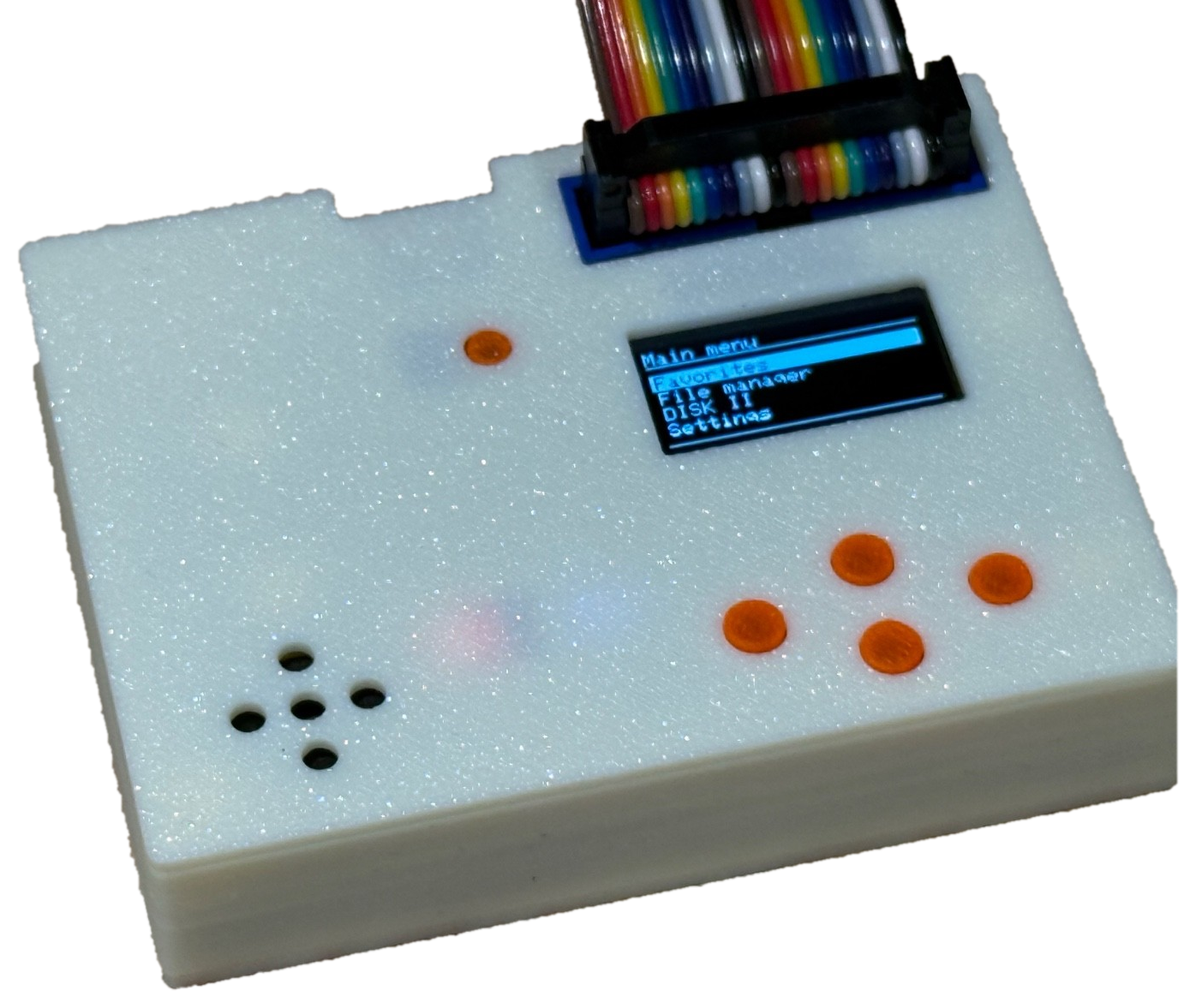
The Apple II floppy emulator that even copy protection can’t tell apart.
Swap a shelf of aging 5.25″ disks for a single SD card — without giving up an ounce of authenticity. SmartDisk II reproduces the exact timing and behaviour of a real DISK II and UNIDISK 3.5 drive, so your games load and run exactly as they did back in the day — protection schemes and all.
What is it
SmartDisk II is an open-source hardware floppy-disk emulator for the Apple II. It plugs into your machine like a real drive, reads disk images straight from an SD card, and lets you browse and mount them from a built-in OLED menu — no PC, no cables, no fuss.
Under the hood it’s built on the STM32F411 (“BlackPill”) and emulates the disk hardware at the bit level. That’s the difference between reading a disk image and being a disk drive — and it’s why SmartDisk II runs the titles other emulators choke on.
Browse and boot — right from the Apple II
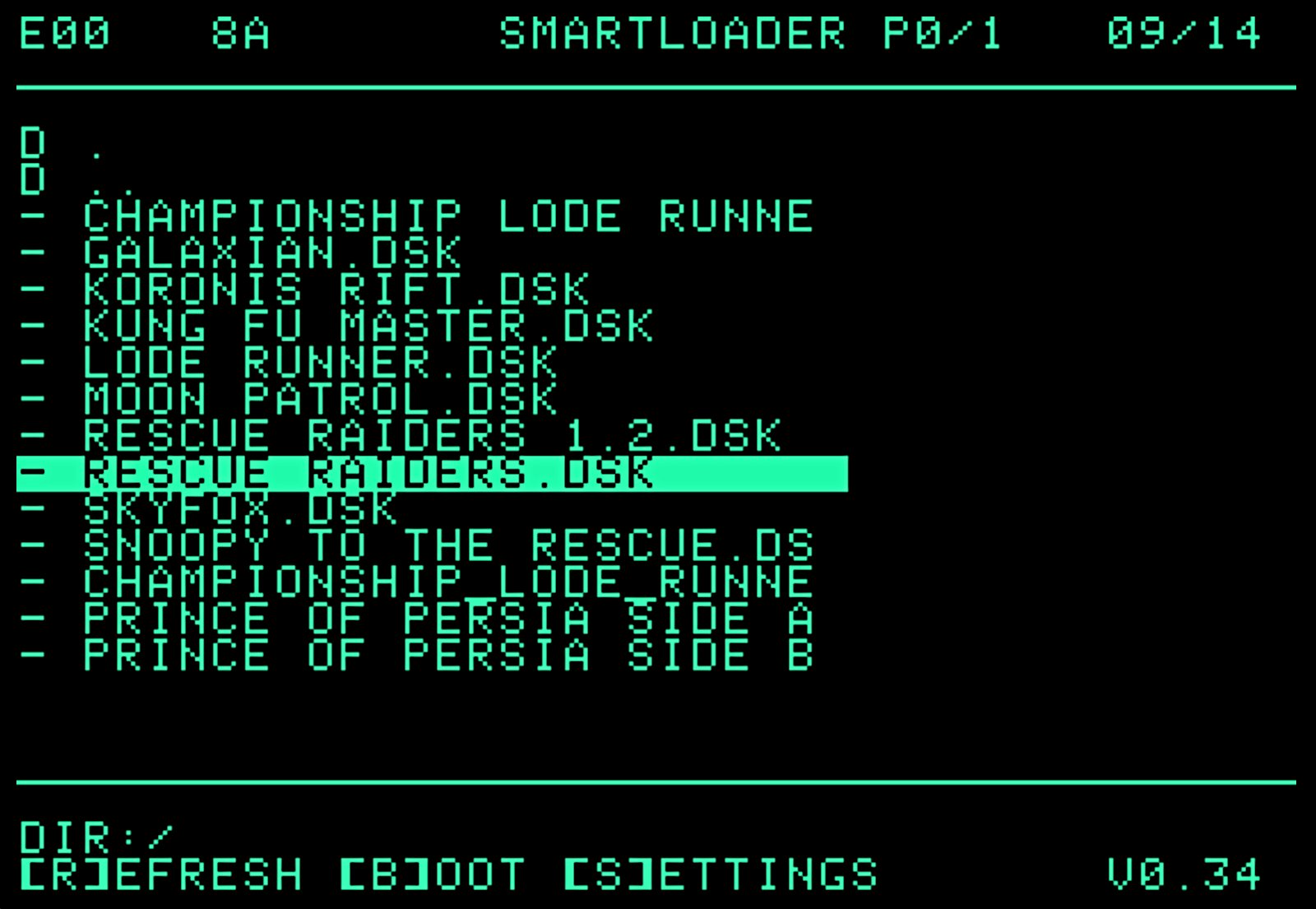
With SmartLoader, you don’t even need the SmartDisk II’s own buttons for everyday loading. It puts a fast green-screen browser on the Apple II itself: SmartLoader reads the disk images on your SD card and lists them right on screen, so you can scroll through your whole collection and boot any title straight from the Apple II — highlight a disk, press [B] to boot, [R] to refresh the listing, or [S] for settings.
Why SmartDisk II
- Bit-perfect accuracy. Timing is reproduced down to the microsecond, so the Apple II can’t tell it apart from a mechanical drive.
- It beats copy protection. Fake bits, weak bits, half-tracks, SpiraDisc and more — it passes every scheme we’ve tested.
- Your whole collection on one card. Thousands of disks on a single SD card, browsable on the on-board OLED.
- Works across the Apple II line. From the II+ to the IIGS, Disk II and SmartPort — one device covers your fleet.
- Read and write. Save your progress and modify disks, not just load them.
- Open source, or ready to run. Build it from published files, or order a prebuilt, flashed board and plug in today.
Copy protection that actually works
Most emulators fall over the moment a disk uses copy protection. SmartDisk II doesn’t. By reproducing the original drive’s bit-level timing, it satisfies the protection checks that real software relied on — so your original protected images run untouched.
| Copy protection | Status |
|---|---|
| Fat Track | ✅ Passed |
| Weak Bit | ✅ Passed |
| Cross-track synchronisation | ✅ Passed |
| Half Track | ✅ Passed |
| Data Latch | ✅ Passed |
| Timing Bits | ✅ Passed |
| E7 | ✅ Passed |
| Optimal Bit Timing (<4µs) | ✅ Passed |
| Various Bit Counter | ✅ Passed |
| SpiraDisc | ✅ Passed |
Compatibility
| Apple II model | Emulation |
|---|---|
| II+ | Disk II |
| II Europlus | Disk II |
| IIe | Disk II |
| IIc (ROM 4) | Disk II + SmartPort |
| IIGS | Disk II + SmartPort |
SmartPort emulation is also available on the IIc (ROM 4.x), IIGS, and on the II+/IIe with a Liron or SoftSP6 card.
Supported disk formats
| Format | Read | Write |
|---|---|---|
| WOZ 2.0 | ✅ | ✅ |
| DSK | ✅ | ✅ |
| PO | ✅ | ✅ |
| 2MG | ✅ | ✅ |
| WOZ 1.0 | ✅ | — |
| NIC | ✅ | — |
Features at a glance
- Three drives in one — DISK II 5.25″, SmartPort HD, and UNIDISK 3.5 emulation
- On-board navigation — browse, mount and unmount images from the 0.96″ OLED with four buttons
- Big images, no sweat — 32 MB images and full Total Replay collections run smoothly
- Modern software too — loads GS/OS on the IIGS; runs titles like Arkanoid from 2MG
- SmartLoader built in
- Actively developed — frequent firmware releases with the latest improvements
See it in action
Total Replay & 32 MB images, running smoothly
Arkanoid, loaded from a 2MG image
Loading GS/OS on the IIGS
Get your SmartDisk II
Buy a prebuilt board. Don’t want to solder? Order a ready-to-use, fully flashed and tested SmartDisk II and plug in today.
Build it yourself. Everything you need is open source — KiCad PCB, Gerber files, bill of materials, 3D-printable case, firmware releases and full source code. (Current production board: Revision 8, recommended for self-builds.)
Get help & follow along. Join the community on Discord, or read the full development story on AppleFritter.
Tech specs
- MCU: STM32F411 (“BlackPill”) — chosen for CPU speed, >60 kB SRAM and 4-bit SDIO
- Storage: SD card, FAT32 (4-bit SDIO for speed) — a quality, known-brand card is recommended
- Display: 0.96″ OLED (SSD1306) with four-button navigation
- Board: Production Revision 8, fully tested
- Licence: open source for non-commercial use with attribution
Licence
This project may be distributed, remixed, adapted and built upon, in any medium or format, for non-commercial purposes only, and only with attribution to the creator. Commercial rights are reserved to the author.