
SmartDisk II · User documentation · Latest firmware
Use the SmartDisk II as an Apple 3.5 inch drive on an Apple IIgs, or as an external 800K drive on a Macintosh. Which images it plays, how to mount them, how to turn on writing, and how the eject works.
← SmartDisk II documentation home · Page 11 of 16
The SmartDisk II can act as a 3.5 inch drive. On an Apple IIgs it is the Apple 3.5 Drive. On a Macintosh it is an external 800K drive. It plays 400K and 800K images from the SD card, and it can write to them.
HD20 emulation (Macintosh): upcoming. It is not available in this firmware yet.
1. Which machines it works with
| Machine | Where you plug the board in | What you can do |
|---|---|---|
| Apple IIgs (ROM 03) | the 3.5 inch drive port (DB-19) | Boot and use 400K and 800K images. Write when 3.5 write is on. |
| Macintosh SE | the external floppy port (DB-19) | Boot, read, write and Initialize an 800K image. Turn on 3.5 Mac host first. |
| Other Macintosh models with an external 800K port | the external floppy port | The same settings apply. The compatibility page lists what is known. |
| Macintosh models with a SuperDrive | the external floppy port | The experimental 1.44 MB mode in section 6. |
- The cable and the connector are described on the hardware page.
- On a IIgs you can also start a 3.5 inch image from the Smartloader, which restarts the IIgs on the image you choose (page 10).
- A Macintosh has no Smartloader. You choose the image on the OLED.
- A Macintosh needs the same SD card as every other machine: FAT32 with 32 KB clusters (page 03).
2. Which image files it plays
The file manager lists these files when the 3.5 inch drive is the running emulation. The extension decides the type, in upper or lower case.
| Extension | What it is | Size it must have | Write |
|---|---|---|---|
.2mg | 2IMG file | 1,600 blocks (800K, two sides) or 800 blocks (400K, one side), in ProDOS block order. A 2MG in DOS order or in nibbles is refused. | Yes, if 3.5 write is on and the image is not flagged locked |
.po, .img | raw blocks, no header | 819,200 bytes (800K) or 409,600 bytes (400K) | Yes, if 3.5 write is on |
.dc42, .dc | DiskCopy 4.2 | 800K or 400K of data. The header must agree with the file. | Yes, if 3.5 write is on |
.moof | Applesauce MOOF of a GCR 3.5 inch disk | 400K one sided or 800K two sided | Yes, in place, if 3.5 write is on (see section 5) |
- A file with the read-only attribute on the card is write protected.
- A raw 800K Macintosh disk with another extension, for example
.dsk, is not listed. Rename it to.img. - A raw image must be in ProDOS block order. A Macintosh HFS disk saved as raw blocks is already in that order.
- Images with 1.4 MB, MFM or flux-only content are refused. The only exception is the experimental 1.44 MB mode in section 6.
- WOZ, DSK, NIC and HDV files are not listed.
- The firmware does not check the data checksum of a DiskCopy 4.2 file, and it does not update it when the Macintosh writes.
If the board refuses an image, you hear the failure sound (with Sound effect on) and the OLED shows an error.
You can create blank, ProDOS and HFS (Macintosh) images for this drive from the file manager. See Create disk and image formats.
3. Use it from the board
The screens are on page 06 and the everyday use is on page 05.
- Go to Settings > Emulation type.
- Select Disk 3.5, then press ENTER. The board restarts.
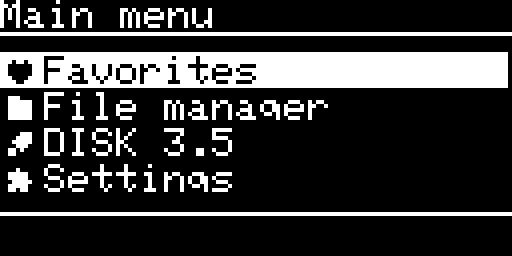
- The main menu now shows Favorites, File manager, DISK 3.5 and Settings.
- Open File manager, select an image and press ENTER.
- Answer YES to
Mounting: NAME.
The image page is the same as for the Disk II. It shows the name of the file, the type (2MG, PO, IMG, DC42 or MOOF), the cylinder in TRACK: with RD, WR or ER, and the flags. WP:Y means the host sees the disk write protected.
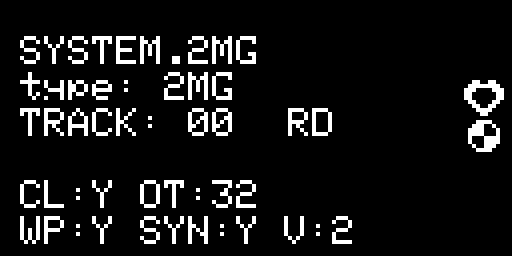
The image menu (Toggle favorite, Unmount image, Delete image) is the same as for the Disk II.
The empty drive
When no image is mounted, the OLED draws an empty 3.5 inch drive with Insert a disk and ENTER: choose image. You see it:
- at start, when no image is mounted,
- after you choose Unmount image,
- after the computer ejects the disk.
Press ENTER to open the file manager.
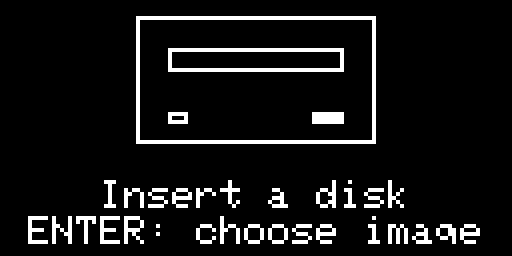
Note: The empty drive does not replace a message. If an error, a question or a name editor is on the screen, it stays there. You see the empty drive when you leave it.
The settings of this emulation
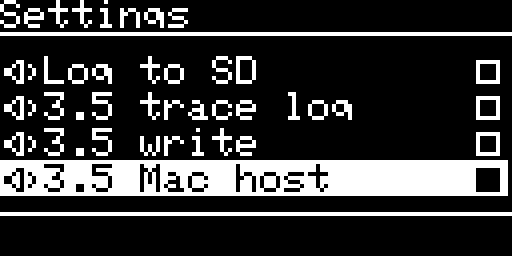
The Settings list shows only the options of the running emulation. These are the options of the 3.5 inch drive. All of them are off by default. The full list is on the settings page.
| Setting | What it does | Takes effect | Shown |
|---|---|---|---|
| 3.5 write | The computer may write to the image on the card. Off: the computer sees a write protected disk. | At once | Always |
| 3.5 fast read | The disk does not turn while the computer is not reading. Sectors come as the computer asks for them. Reading is faster, but less like a real drive. | At once | IIgs only |
| 3.5 fast seek | A head step counts as done at once, and the tracks load when the head stops. Seeking is faster, but less like a real drive. | At once | IIgs only |
| 3.5 trace log | Prints what the computer asks the drive to do on the serial port. Use it when someone asks you for a log (page 14). | At once | Always |
| 3.5 Mac host | The board serves a Macintosh instead of a IIgs. | After you confirm, the board restarts | Always |
| 3.5 SuperDrive | The drive answers as a 1.44 MB SuperDrive. Experimental, see section 6. | After you confirm, the board restarts | Only with 3.5 Mac host on |
With 3.5 Mac host on, 3.5 fast read and 3.5 fast seek disappear from the list and stay off. A Macintosh checks the speed of the disk, so the drive always runs in real time.
Note: 3.5 Mac host and 3.5 SuperDrive ask you first. Press ENTER once to see ENTER: host+reset (or ENTER: drive+reset). Press ENTER again to confirm. The board saves the option and restarts.
4. Use it on an Apple IIgs
- Select Disk 3.5 as the emulation (section 3).
- Mount an image.
- Connect the board to the 3.5 inch drive port of the IIgs and start the IIgs. It boots from the image.
By default the IIgs sees the disk write protected. Turn on 3.5 write if the IIgs must write to it.
5. Use it on a Macintosh
The drive on a Macintosh behaves like an external 800K drive. The Macintosh reads the status of the drive differently from a IIgs, so the board needs to know which one it serves.
- Go to Settings and select 3.5 Mac host.
- Press ENTER twice. The board restarts.
- Turn on 3.5 write if the Macintosh must write to the disk.
- Mount an image from the file manager.
- Connect the board to the external floppy port of the Macintosh and start it.
To start the Macintosh from the image, leave the internal drive empty. A Macintosh looks in its internal drive first. You can also mount an image while the Macintosh runs. The Macintosh notices the new disk.
Which image to mount
- An 800K HFS disk works as it is. Create disk can make an empty HFS volume for you.
- A blank image or a ProDOS image is not a Macintosh disk. The Macintosh offers to initialize it.
- With 3.5 write on, Initialize completes and writes the new volume to the image on the card. It works on a Macintosh SE.
- An empty HFS image made by Create disk has no System file. It is not a startup disk.
Note: Initialize erases the image. Check the name before you agree to it, and keep a copy of any image you care about.
Writing
With 3.5 write on, the Macintosh can write, copy files and initialize a disk. The board stores what the Macintosh writes in the image on the card. A short delay can pass between the Macintosh finishing a write and the card holding the data.
Note: Choose Unmount image before you switch off the board or remove the card. The board then writes everything that is still waiting. If you cut the power while data is waiting, you lose it.
- The 12 tag bytes of each Macintosh sector are not stored. HFS volumes do not need them.
- A 400K image has one side. If the Macintosh writes to the second side, the board refuses that write.
Eject
- From the computer. The IIgs or the Macintosh ejects the disk (on a Macintosh: drag the disk to the trash, or use Eject Disk in the Special menu). The OLED shows the empty drive. The board writes any pending data first. An eject request that arrives before the Macintosh has used the disk is ignored.
- From the board. Choose Unmount image in the image menu.
With Sound effect on, an eject plays an eject sound and a new image plays an insert sound.
MOOF images
A MOOF file holds the bit stream of each track exactly as it was recorded, so the drive can play disks with unusual formats. Create disk can make blank, ProDOS (boot and empty) and HFS (800K) MOOF files.
- Accepted: 400K one sided and 800K two sided GCR disks.
- Refused: 1.44 MB MFM disks, flux-only files and Twiggy disks.
- A track that the file does not record plays as an empty track.
- 3.5 fast read is off while a MOOF image is in the drive.
- With 3.5 write on, and a file that is neither flagged write protected nor read-only on the card, the computer can write. The firmware replaces the data of each sector in the file and writes only the parts of the file that changed.
- The first write sets the checksum (CRC32) in the file header to 0, which means “not calculated” in the MOOF specification.
- If the computer formats a MOOF disk, the sector layout of the file stays as recorded and only the sector data change.
6. The 1.44 MB SuperDrive (experimental)
The SuperDrive mode is experimental. It lets a Macintosh with a SuperDrive read a 1.44 MB disk image. It works only if the ROM of your Macintosh supports a SuperDrive on its external port.
You need:
- 3.5 Mac host on,
- 3.5 SuperDrive on,
- a 1,440K image (2,880 blocks) as a raw file (
.img,.po), a 2MG or a DC42 file.
- Turn on 3.5 Mac host (section 5), then turn on 3.5 SuperDrive. Press ENTER twice for each. The board restarts.
- Mount the 1,440K image.
- Start the Macintosh.
The Macintosh checks the type of the drive when it starts, so set 3.5 SuperDrive before you start it. A 1,440K image mounted with 3.5 Mac host on also makes the drive a SuperDrive.
- The 1.44 MB image is read only. The Macintosh cannot write to it or format it.
- Create disk can make an empty HFS 1,440K
.imgfile when 3.5 Mac host is on. - Without 3.5 Mac host, the board refuses a 1,440K image.
7. Problems
- The Macintosh says the disk is unreadable and offers to initialize it. The image is not an HFS disk. Choose another image, or let the Macintosh initialize it with 3.5 write on.
- The Macintosh does not see the drive. Check that 3.5 Mac host is on and that you restarted the board after you turned it on.
- The IIgs or Macintosh cannot write. Turn on 3.5 write, and check that the image is not flagged locked and does not have the read-only attribute.
- The file is not in the list. Check the extension against the table in section 2.
- The board shows an error when you mount an image. The card needs 32 KB clusters, and the image must have one of the sizes in section 2.
More help and the log are on the troubleshooting page.
Note: The Emulation type list shows an entry named HD20 (Mac). It is not usable yet. Do not select it.
← Previous
SmartDisk II user documentation · latest firmware · Documentation home