
SmartDisk II · User documentation · Latest firmware
Use the SmartDisk II as a 5.25 inch Disk II drive. Which images it takes (WOZ, DSK, DO, PO, NIC), how to mount them, how writes and write protection work, what the WeakBit option does, and what to do when something does not work.
← SmartDisk II documentation home · Page 8 of 16
In this mode the SmartDisk II behaves like a 5.25 inch Disk II drive. The Apple II reads and writes the disk image on your SD card as if it were a floppy disk.
The board plays the disk bit by bit, with the timing of a real drive. That is why disks with copy protection run.
1. What it emulates, and on which machines
The SmartDisk II is one Disk II drive with one image mounted at a time. The head moves in quarter track steps, as on a real drive.
| Apple II model | Emulation |
|---|---|
| II+ | Disk II |
| II Europlus | Disk II |
| IIe | Disk II |
| IIc (ROM 4) | Disk II and SmartPort |
| IIgs | Disk II and SmartPort |
The cable and the connector for each machine are on the hardware page. The machines and the copy protection schemes that work are on the compatibility page.
The Smartloader uses this same emulation to boot (Smartloader).
Note: A IIgs with ROM 03 first looks for SmartPort devices before it boots a 5.25 inch disk. The SmartDisk II steps aside for that look, so the IIgs goes on to boot your Disk II image.
2. What it needs on the card, and which files it accepts
The card must be FAT32 with 32 KB clusters (SD card preparation). If it is not, the OLED shows CLUSTER NOT 32K at power up and the board refuses every image. Settings > Make filesystem prepares a card correctly.
| Extension | What it is | Size accepted | Read | Write |
|---|---|---|---|---|
.woz | WOZ 1, WOZ 2 or WOZ 2.1 (a 2.1 file is played as a WOZ 2 file) | tracks of up to 53,248 bits, file up to about 1.25 MB | yes | yes |
.dsk, .do | 35 tracks of 16 sectors of 256 bytes, no header | 143,360 bytes (35 tracks) or 163,840 bytes (40 tracks) | yes | yes |
.po | the same disk in ProDOS block order (140K) | 143,360 or 163,840 bytes | yes | yes |
.nic | the nibbles of the tracks (see section 4) | at least 286,720 bytes | yes | yes |
Other points:
- The Disk II emulation does not take
.2mg,.dc42,.dc,.img,.hdv,.nibor a WOZ file of a 3.5 inch disk. A.2mgfile goes to SmartPort (SmartPort emulation) or to the 3.5 inch drive (3.5 inch drive). - The file list shows only the extensions above, in upper or lower case (
GAME.DSKandgame.dskboth appear). - The file list hides a file with a name of 3 characters or fewer, a name that starts with a dot (the
._Game.dskfiles that macOS leaves on the card), a hidden or system file, and a folder that starts with a dot. - A folder lists its first 255 entries, folders first, in name order.
- A file with the read-only attribute on the card is mounted write protected, whatever its format says.
- A WOZ file larger than about 1.25 MB is refused when it has tracks beyond that size.
- You can make blank images on the board with Create disk (Create disk and image formats).
3. How to use it from the board
The screens of the OLED are on the OLED screens page. Day to day use is on the usage guide. In short:
- Choose the emulation. Open Settings > Emulation type, choose Disk II and press RET. The board restarts in the new emulation (settings reference). The main menu then offers Favorites, File manager, DISK II and Settings.
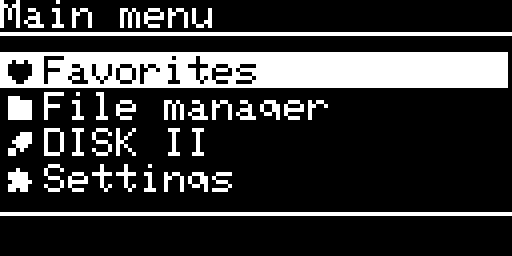
The main menu of the Disk II emulation - Open the File manager. UP and DOWN move. ENTER opens a folder or an image. ENTER on the
.entry of a folder opens Directory options: Refresh, Create disk, New folder and Delete folder. - Mount an image. ENTER on an image asks
Mounting: NAMEwith YES selected. ENTER on YES mounts the image. NO goes back.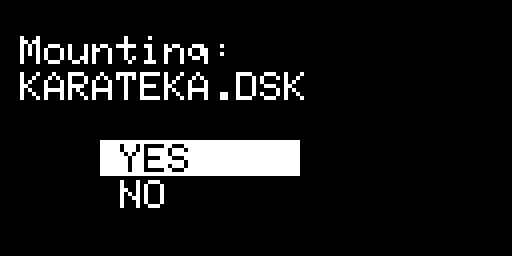
The question before mounting an image If the board cannot mount the file, the OLED shows MOUNT FAILED and the drive is empty. With Sound effect on, you also hear two beeps and a falling tone.
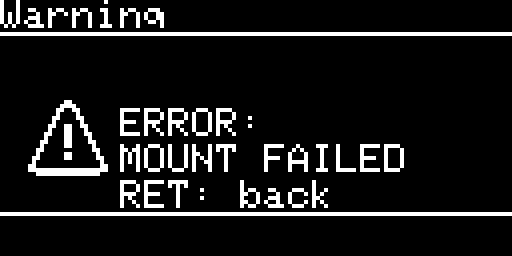
The error screen after a refused image - Read the image page. It shows the mounted image:
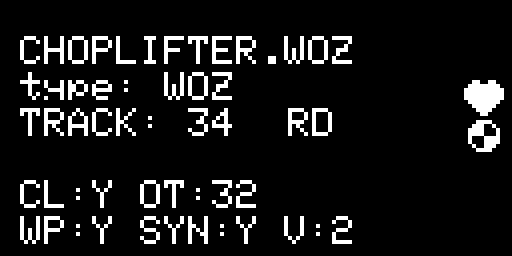
The image page of a WOZ image: name, type, track and access label, then the image flags - Line 1 is the file name. Line 2 is the type (
NIC,WOZ,DSKorPO). - Line 3 is the track. On the right, RD means the track was read. WR means the Apple II wrote the track and the card holds it. ER means the card does not hold what the Apple II wrote, or a track could not be read.
- The heart at the top right is on when the image is a favorite.
- The last two lines are flags of a WOZ file:
CL(cleaned),SYN(synchronised),OT(the bit timing in units of 125 ns: 32 is 4 microseconds),WP(write protected, as the Apple II sees it) andV(the WOZ version). For a DSK, DO, PO or NIC imageCLandSYNshow N,Vshows 0 andOTshows 32.
- Line 1 is the file name. Line 2 is the type (
- Open the image menu. ENTER on the image page opens Toggle favorite, Unmount image and Delete image. Delete image asks again before it deletes the file.
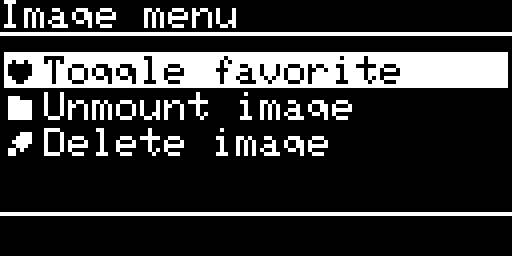
The image menu - Eject. Unmount image empties the drive. The OLED then draws an empty drive with Insert a disk. ENTER opens the file list. You see the same page at power up when no image is mounted, and after the Apple II ejects the disk.
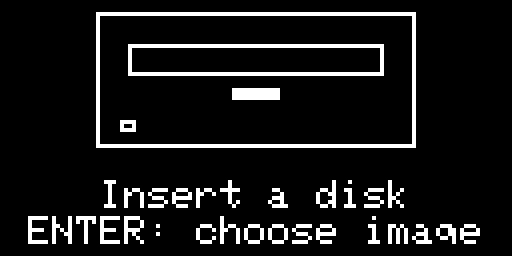
The empty drive page With Sound effect on, an image going in plays a short insert sound and an image leaving plays an eject sound.
- Choose what happens at power up. Boot last image mounts the image you used last. Boot last dir opens the last folder. Boot favorites opens the favorites list. The last two mount nothing.
The Settings list shows only the options of the emulation that runs. In Disk II mode you find Sound effect, Screen saver, Log to SD, WeakBit and 5.25 write, with Clear prefs, Clear favorites and Make filesystem. Every option is explained on the settings page.
4. How it behaves
Write protect: the rule
The Apple II sees the image as write protected when any one of these is true:
| Cause | Where it comes from |
|---|---|
| The image says so | the write protect flag of a WOZ file |
| The file is read-only on the card | the FAT read-only attribute |
| 5.25 write is off | Settings; it acts at once |
The image page shows the result as WP:Y or WP:N. 5.25 write is on by default. It does not apply to the Smartloader.
Note: To protect an image for good, give the file the read-only attribute on your computer. Then no setting can write to it.
How a write reaches the card
- The Apple II writes a whole track. The board records it.
- When the write is over, the board writes the track to the card, once per track. The OLED shows WR. With Sound effect on, you hear ticks. If the card refuses, the board tries once more, then shows ER.
- A WOZ file keeps a checksum in its header. The board updates it when the drive has been idle for one second, and before it mounts another image.
Note: After the Apple II has written to a disk, wait until the OLED shows WR, and one more second for a WOZ image, before you switch off the Apple II or remove the card. A track that the Apple II is still writing when it deselects the drive is not kept.
Formats, and what the board converts
- WOZ: the bits of a track are played as they are. The file has one entry per quarter track, so half tracks and quarter tracks are exactly those of the file. A WOZ 2 file asks for its own bit timing. The board accepts timings from 3 to 6 microseconds and uses 4 microseconds for any other value.
- DSK, DO, PO: the file holds the data only. The board builds the nibbles (gaps, address fields with volume 254, data fields) when the head arrives on a track, and decodes them again when the Apple II writes. A sector that does not decode keeps its old content and the page shows ER. The sector order (DOS or ProDOS) comes from the content of the image first, then from the extension.
- NIC: 35 tracks of 16 sectors. Each sector is a block of 512 bytes, and the first 416 bytes hold the nibbles. The board reads and writes this layout as it is. A usual
.nibfile (6,656 bytes a track) is a different layout and is not accepted. - Half tracks: for DSK, DO, PO and NIC a half track or quarter track position reads the whole track below it.
- Formats that keep a copy protection: a protection written in the track (half tracks, fat tracks, timing bits) cannot live in a DSK, DO, PO or NIC file. Use WOZ for those disks.
Bit timing
The bit cell lasts 4 microseconds. A WOZ 2 file may ask for another value (the page shows it as OT).
Note: The timing of a WOZ file applies when you mount the image from the menu. An image that Boot last image mounts at power up always plays at 4 microseconds. If a WOZ image needs its own timing, mount it from the file manager.
Weak bits
Some copy protections need a track whose bits change from one read to the next. The option WeakBit (Settings) makes the board replace long runs of zero bits with a fixed pattern of pseudo random bits. A protected disk then reads different data each time, as it does on a real drive.
- The option is off by default. Turn it on when a protected WOZ image does not run. The Print Shop Companion and Commando needed it in testing.
- The option acts on whatever image is mounted while it is on. Ordinary disks do not contain long runs of zero bits, so it has no effect on them.
- It acts at once. The Smartloader page offers it too while the Smartloader loads Disk II images (Smartloader).
5. Limits and known issues
| Point | What to know |
|---|---|
| A write followed at once by a power cut or a card removal | The last track can be lost. Wait for WR (see the note above). |
| A WOZ file larger than 1.25 MB | A track beyond that size is refused when you mount the image. |
| A CPU accelerator in the Apple II | Writes can fail. A IIgs fitted with a CPU accelerator wrote with the wrong timing, so the Smartloader commands and some writes failed. The same board worked on a stock IIe and on a IIgs with its original CPU. If writes fail, check for an accelerator first. |
| An image the board cannot mount | The OLED shows MOUNT FAILED and the drive is empty. Press RET, then choose another image. |
| Pulling the card out | The OLED shows SD EJECTED. Put the card back and press ENTER to restart the board. The board does not restart by itself. |
If something goes wrong, see Troubleshooting, FAQ and the log.
← Previous
SmartDisk II user documentation · latest firmware · Documentation home